EducationSoftwareStrategy.com
StrategyCommunity

Knowledge Base

Product

Community

Knowledge Base

TopicsBrowse ArticlesDeveloper Zone

Product

Download SoftwareProduct DocumentationSecurity Hub

Education

Tutorial VideosSolution GalleryEducation courses

Community

GuidelinesGrandmastersEvents
x_social-icon_white.svglinkedin_social-icon_white.svg
Strategy logoCommunity

© Strategy Inc. All Rights Reserved.

LegalTerms of UsePrivacy Policy
  1. Home
  2. Topics

KB46924: 405 error "The request method POST is inappropriate for the URL /" encountered when users click an "Is Hyperlink" link to an external site in MicroStrategy Web


Community Admin

• Strategy


SYMPTOM:
 
In Strategy Web 9.4.1 Hotfix 3, users can add hyperlinks to text boxes using either the "Edit Links" feature, or the "Is Hyperlink" feature in Properties & Formatting. If using "Is Hyperlinks", customers will run into the following error when clicking on the link in Google Chrome from Strategy Web DHTML modes:

ka04W000000Oe4HQAS_0EM440000002683.png

Sample Code/Error


Google
405. That's an error.
The request method POST is inappropriate for the URL /.
That's all we know.

 
The same link from Internet Explorer will not show this error, but it also will not navigate to the specified URL. Instead, clicking the hyperlink will bring the user to the last URL that was entered into the browser.
 
STEPS TO REPRODUCE:
 
To reproduce the issue, follow the steps below:

  1. Create a document in Strategy Web 9.4.1 Hotfix 3.
  2. Create 2 text boxes with text inside.
  3. In the first text box, right-click to go to Edit Links, and add www.google.com as the URL to navigate to.
  4. In the second text box, right-click to go to Properties & Formatting, enable "Is Hyperlink", and add www.google.com as the hyperlink.
  5. Execute the document in Interactive Mode. Notice that clicking on "Edit Links" navigates to the correct URL, but clicking on "Is Hyperlink" does not.

CAUSE:
 
This is a known issue in Strategy Web 9.4.1 Hotfix 3.
 
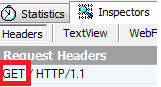
The link added to the "Navigate to this URL" portion of Edit Links executes properly. After running a Fiddler trace as per tech note KB20064,  the Request Header that is captured for Edit Links is "GET", as shown below:
ka04W000000Oe4HQAS_0EM440000002685.png


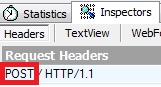
The same URL from "Is Hyperlink" captures the Request Header as "POST", as shown below:
ka04W000000Oe4HQAS_0EM440000002682.png

 
The link fails because the remote web site does not accept POST requests.
 
ACTION:
 
This issue has been addressed in Strategy Web 9.4.1 HF5. Upgrade to this version to take advantage of the fix.
 
WORKAROUND:
 
Because this issue only occurs in DHTML modes, users can use Express Mode to work around this issue. Additionally, this issue does not occur in Strategy Web 9.4.1 GA. Customer's can revert back from Hotfix 3 to work around this issue.


Comment

0 comments

Details

Knowledge Article

Published:

March 30, 2017

Last Updated:

March 30, 2017