EducationSoftwareStrategy.com
StrategyCommunity

Knowledge Base

Product

Community

Knowledge Base

TopicsBrowse ArticlesDeveloper Zone

Product

Download SoftwareProduct DocumentationSecurity Hub

Education

Tutorial VideosSolution GalleryEducation courses

Community

GuidelinesGrandmastersEvents
x_social-icon_white.svglinkedin_social-icon_white.svg
Strategy logoCommunity

© Strategy Inc. All Rights Reserved.

LegalTerms of UsePrivacy Policy
  1. Home
  2. Topics

KB46925: Creating a shared link for a report or document in a project that contains special characters in its name will not work properly in MicroStrategy Web 9.x


Community Admin

• Strategy


MicroStrategy Web 9.x users may notice that sharing a link for a report or document will render the login screen with an incorrect project name if the project name contains special characters, such as an ampersand (&)

SYMPTOM:
Strategy Web 9.x users may notice that sharing a link for a report or document will render the login screen with an incorrect project name if the project name contains special characters, such as an ampersand (&).
Depending on which Strategy Web version is installed, the error will vary. As an example, for executing a report in a project where the project name is Strategy & Tutorial, users on Strategy Web 9.4.1 Hotfix 2 or earlier may see an error that looks like the following:

ka04W000000OeiHQAS_0EM440000002692.png

For users on Strategy Web 9.4.1 Hotfix 3, the error may contain an Usher QR code, like shown below:

ka04W000000OeiHQAS_0EM44000000269J.png

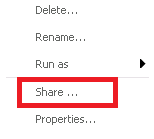
This error occurs when the "Show link" URL to a report or document is used from the "Share..." menu, like shown here:
ka04W000000OeiHQAS_0EM44000000269D.png
ka04W000000OeiHQAS_0EM44000000269I.png

Inspecting the URL will show that the special character is incorrectly XML encoded instead of URL encoded. In the example used above, the project name parameter of the URL is &Project=Strategy%20%26amp%3B%20Tutorial which decodes to Strategy & Tutorial instead of the expected Strategy & Tutorial.
 
CAUSE:
This is a known issue with sharing links in Strategy Web 9.x.
 
ACTION:
This issue has been addressed in Strategy Web 9.4.1 HF4. Upgrade to this version to take advantage of the fix.
 
WORKAROUND:
The link generated by the properties menu instead of the "Share..." function will work properly. To generate that link, follow these steps:


  • Right click the document or report and select "Properties" as shown below:
     
ka04W000000OeiHQAS_0EM44000000269G.png
  • In the new window, copy the link shown at the bottom as follows:
     
ka04W000000OeiHQAS_0EM44000000269K.png
  •  
    The Project name will show &Project=Strategy+%26+Tutorial, which is the correct encoding.

Comment

0 comments

Details

Knowledge Article

Published:

June 7, 2017

Last Updated:

June 7, 2017