EducationSoftwareStrategy.com
StrategyCommunity

Knowledge Base

Product

Community

Knowledge Base

TopicsBrowse ArticlesDeveloper Zone

Product

Download SoftwareProduct DocumentationSecurity Hub

Education

Tutorial VideosSolution GalleryEducation courses

Community

GuidelinesGrandmastersEvents
x_social-icon_white.svglinkedin_social-icon_white.svg
Strategy logoCommunity

© Strategy Inc. All Rights Reserved.

LegalTerms of UsePrivacy Policy
  1. Home
  2. Topics

KB46938: "Specified driver could not be loaded" error message is seen when trying to establish connection to a Teradata 14.10 database through MicroStrategy DB Query Tool on Red Hat Linux 6.x


Community Admin

• Strategy


This KB addresses an error seen when connecting to Teradata 14.10 through MicroStrategy DB QueryTool.

SYMPTOM:
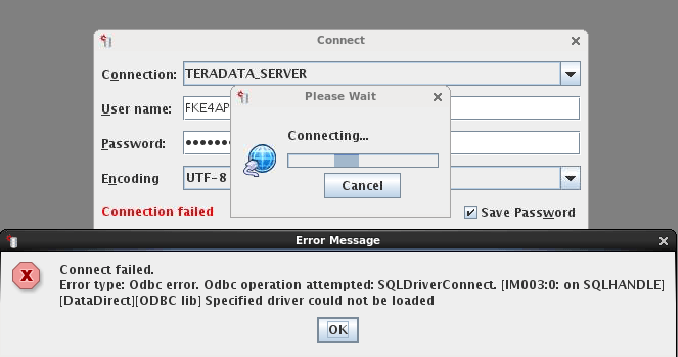
When trying to establish connection to a Teradata 14.10 warehouse through Strategy DB Query Tool on Red Hat Linux 6.x, the following error message is seen:
ka04W000000OfR2QAK_0EM440000002JCF.png


Specified driver could not be loaded

This error may still occur even after the odbc.ini and odbcinst.ini files have been correctly configured.
 
CAUSE:
This error can occur if the the odbc.sh file has not been correctly configured.
 
ACTION: 
Edit the odbc.sh file to add the location of the directory where the Teradata driver is installed to the MSTR_TERADATA_PATH variable such as in the example below: 


Sample Code/Error
#
# ODBC Driver for Teradata
#

MSTR_TERADATA_PATH='/opt/teradata/client/14.10/odbc_32'

if [ "${MSTR_TERADATA_PATH}" != '<MSTR_TERADATA_PATH>' ]; then

mstr_append_path LD_LIBRARY_PATH "${MSTR_TERADATA_PATH:?}"/lib

export LD_LIBRARY_PATH

fi


The default location of the odbc.sh file is at: /var/opt/MicroStrategy/env.


Comment

0 comments

Details

Knowledge Article

Published:

April 24, 2017

Last Updated:

April 24, 2017