SYMPTOM:
In Strategy Object Manager, a user creates an update package for a Freeform SQL report and all its used dependencies from source project. Before importing the package to the target project, an undo package is generated. After the update package is imported to target project, the user tries to import the undo package which is supposed to delete the new objects that was previous created in target project. However, there are attribute and table cannot be deleted if they are associated with the Freeform SQL report.
STEPS TO REPRODUCE:
The following steps are performed in Strategy Tutorial. Use Strategy Tutorial as the source and My First Project as the target.
1) Use SQL statement: select COUNTRY_ID from LU_COUNTRY.
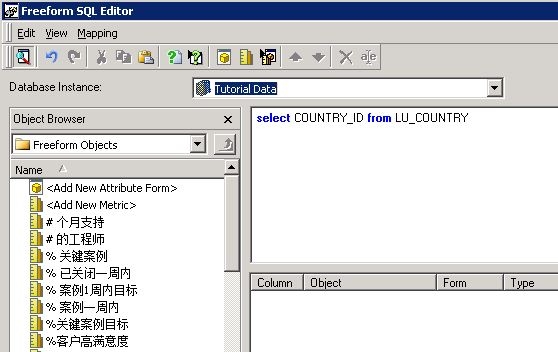
2) Add new attribute form. Manually type the form name TEST.
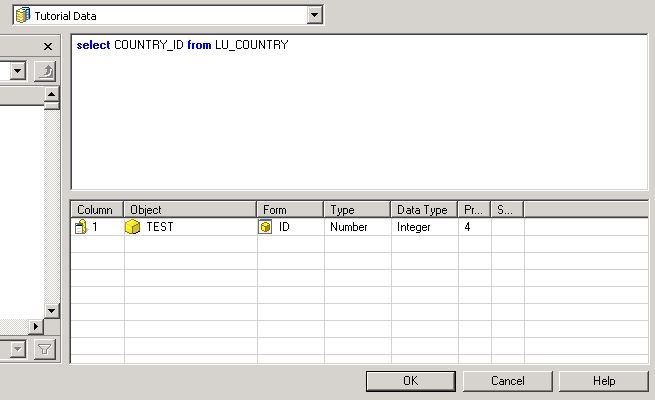
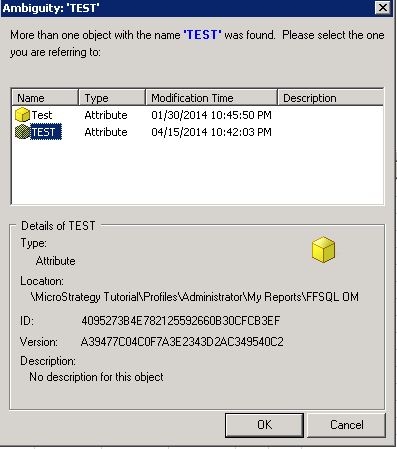
3) Click OK. The user will be prompted to choose map the new attribute to the existing attributes who have the same name TEST. Choose the one that created in step1.
4) Save report.
5) Create a Strategy Object Manager package and undo-package of this object and its dependents.
6) Import the Strategy Object Manager package.
6) Import the unfo-package and notice the attributes and tables are not successfully removed.
CAUSE:
This is a known issue in Strategy Object Manager 9.4.x.
If search for the dependent objects for attribute TEST, a hidden shortcut object with same name TEST is found under path "System Objects\Schema Folder\Schema - Tutorial Data Attributes". The existence of this shortcut object is preventing from removing the attribute. Object Manager fails to include the shortcut in the undo package and as a result, the attribute and table are not removed.
ACTION:
This issue is fixed in Strategy 9.5 and above. Please upgrade to this version to take advantage of the fix.
WORKAROUND:
A temporary workaround can be applied. Manually delete the shortcut object first. Then manually delete the attribute and table object in sequence. Since the shortcut object is hidden in System Object folder, it's necessary to make following display settings to make it visible when searching for dependent objects for the attribute.
