EducationSoftwareStrategy.com
StrategyCommunity

Knowledge Base

Product

Community

Knowledge Base

TopicsBrowse ArticlesDeveloper Zone

Product

Download SoftwareProduct DocumentationSecurity Hub

Education

Tutorial VideosSolution GalleryEducation courses

Community

GuidelinesGrandmastersEvents
x_social-icon_white.svglinkedin_social-icon_white.svg
Strategy logoCommunity

© Strategy Inc. All Rights Reserved.

LegalTerms of UsePrivacy Policy
  1. Home
  2. Topics

KB46965: How to display the metric for even or odd values in reports MicroStrategy Developer 9.x


Stefan Zepeda

Salesforce Solutions Architect • Strategy


How to display the metric for even or odd values in reports MicroStrategy Developer 9.x

This document introduces how to show only even or odd values of the metric in integer format in the reports. In General, the method uses an intermediate metric which is the mod of the source metric, to filter the even and odd values according to the result of mod.
 
Below is an example. The purpose is to filter the even and odd values for a metric whose name is 'Rank'.
 

ka02R000000kbo0QAA_0EM440000002CNI.jpeg


Also, the "Mod-Rank" can be "Removed from Grid" so that it won't appear in the grid.


  • Create a derived metric and define as: Mod(Rank,2). Name this metric as "Mod-Rank"
     
ka02R000000kbo0QAA_0EM440000002CNF.jpeg
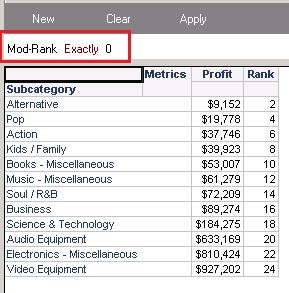
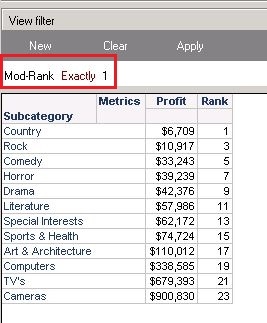
  • Add view filter on "Mod-Rank" to display even or odd Ranks.
     
    - To display even Ranks, define the filter as "Mod-Rank" = 0;
     
ka02R000000kbo0QAA_0EM440000002CNN.jpeg
  •  
    - To display odd Ranks, define the filter as "Mod-Rank" = 1;
     
ka02R000000kbo0QAA_0EM440000002CNK.jpeg


Comment

0 comments

Details

Knowledge Article

Published:

June 8, 2017

Last Updated:

June 8, 2017