SYMPTOM:
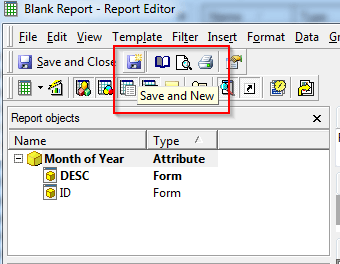
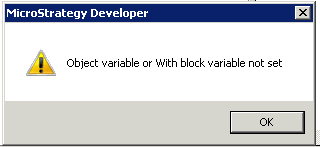
When clicking on the "Save and new" option in the Report Editor in Strategy Developer, as seen in the screenshot below, users get an error that reading Object variable or With block variable not set. This issue is specific to the Windows user logged on to the machine. Therefore, logging out of Windows and logging back in with another user will not necessarily throw the error.
CAUSE:
This is a known issue in the case that it is specific to the user logging into the Windows machine.
ACTION:
The workaround in the section below is the recommended action that has been successfully tested by Strategy Technical Support. If the workaround is not successful, then a full uninstall/reinstall of Strategy Developer on the affected machine is the recommended action.
WORKAROUND:
1) On the affected Windows machine, back up the necessary files/folders in the affected user's Windows profile folder. For example C:\Users\johndoe\
2) As a local Administrator on the Windows machine, delete the Windows user profile folder, for example: C:\Users\johndoe\
3) Log back into the Windows machine as the affected user, at which point the Windows profile folder should be automatically recreated by the system.
4) Add all backed up files/folders back into the user's profile folder.
5) Re-open Strategy Developer and the "Save and new" option should now work without issue.
As mentioned above, if these steps do not resolve the issue, a full uninstall/reinstall of Strategy Developer on the affected machine is the recommended action.
