EducationSoftwareStrategy.com
StrategyCommunity

Knowledge Base

Product

Community

Knowledge Base

TopicsBrowse ArticlesDeveloper Zone

Product

Download SoftwareProduct DocumentationSecurity Hub

Education

Tutorial VideosSolution GalleryEducation courses

Community

GuidelinesGrandmastersEvents
x_social-icon_white.svglinkedin_social-icon_white.svg
Strategy logoCommunity

© Strategy Inc. All Rights Reserved.

LegalTerms of UsePrivacy Policy
  1. Home
  2. Topics

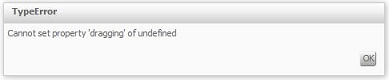
KB46971: "Cannot set property 'dragging' of undefined" error message appears when running a document in express mode and changing the zoom size in MicroStrategy 9.4.1


Community Admin

• Strategy


"Cannot set property 'dragging' of undefined" error message appears when running a document in express mode and changing the zoom size in MicroStrategy 9.4.1


ka04W000000OaZBQA0_0EM44000000265F.png

 
"Cannot set property 'dragging' of undefined" error can be seen when running a document/dashboard and the following conditions are met:
 
- The document contains a Panel Stack with 2 panels
- One of the panels contains a Slider Selector
- The Slider Selector is on the Panel that is not visible at run time
- The document is run in Express Mode
 
REPRODUCTION STEPS:

  1.  Create a new blank document.
  2. Add a panel stack and 2 panels.
  3. Add a slider selector on the 2nd panel and run the document in express mode only showing the first panel on load.
  4. Change the zoom size to 150% 

 
CAUSE:
This is a known issue in Strategy 9.4.1
 
ACTION:
This issue has been addressed with Strategy 9.4.1 Hotfix 5. Upgrade to take advantage from the fix.
 
WORKAROUND:
To work around this issue a different type of selector is required or a different view mode since this issue only occurs in Express Mode.
KB000002306


Comment

0 comments

Details

Knowledge Article

Published:

May 23, 2017

Last Updated:

October 1, 2018