SYMPTOM:
Duplicate custom group elements are displayed on a report. However there are different metric values associated with each element. In the example below notice that the element ">50" appears twice on the grid.

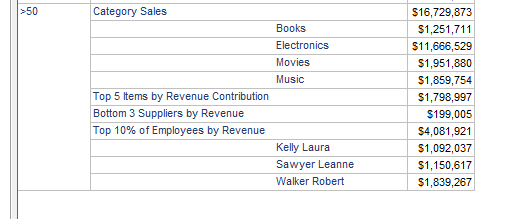
The user would like to see the duplicate elements consolidated so that only one element displays instead of multiple separate elements with identical names. In this example, the user would like to see ">50" appear only once on the grid, and have the associated metric values merged and summed as seen below:
CAUSE:
This issue will occur when 2 custom group elements exist in the custom group with the same name, but with different definitions. In the above example, there are 2 instances of the element ">50", each of which has a different definition as seen below:

ACTION:
Create a single custom group element that contains all filter definitions of the identically named elements. Join the filter definitions of the identically named elements with an OR condition.

Note that the filter definition of the duplicated elements have now been consolidated into one custom group element. The grid will now display as desired. The report SQL will process this single custom group element with both filters instead of keeping them separate reducing both possible fact table usage and the number of separate final selects of data back to Strategy.
