EducationSoftwareStrategy.com
StrategyCommunity

Knowledge Base

Product

Community

Knowledge Base

TopicsBrowse ArticlesDeveloper Zone

Product

Download SoftwareProduct DocumentationSecurity Hub

Education

Tutorial VideosSolution GalleryEducation courses

Community

GuidelinesGrandmastersEvents
x_social-icon_white.svglinkedin_social-icon_white.svg
Strategy logoCommunity

© Strategy Inc. All Rights Reserved.

LegalTerms of UsePrivacy Policy
  1. Home
  2. Topics

KB46989: Unable to link and unlink attributes on a VI Dashboard.


Community Admin

• Strategy


In MicroStrategy Web, the ability to link attributes in Visual Insight Dashboards is not available.

 
SYMPTOM
In Strategy 9.4.1 some of the Dashboards do not have the option to link or unlink attributes.
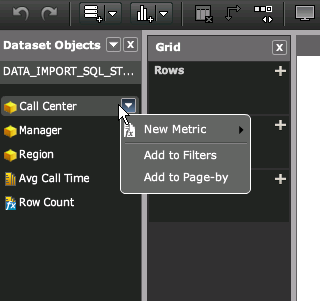
 

ka04W000000OeIBQA0_0EM44000000265G.png

 
However the options to link - unlink attributes are available in other dashboards.
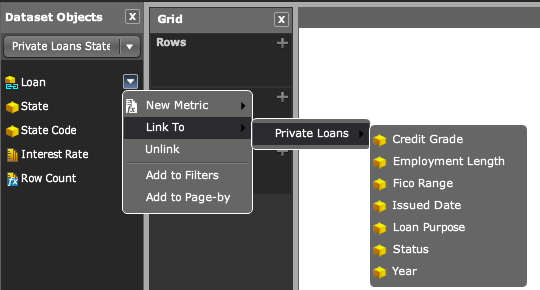
 

ka04W000000OeIBQA0_0EM44000000265D.png


CAUSE
In Strategy 9.4.1 the ability to link between cubes was introduced, however this only works when linking cubes that are created with data import since they have no relation with the project hierarchy. Intelligent cubes use hierarchy attributes and hence do not show the option.
 
Additionally when adding several Intelligent Cubes that share common attributes as datasets to the same Dashboard they will be linked automatically.
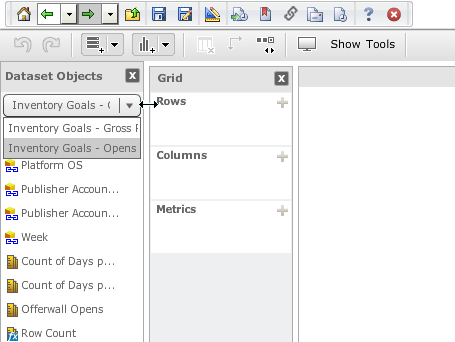
 

ka04W000000OeIBQA0_0EM44000000265H.png


Comment

0 comments

Details

Knowledge Article

Published:

June 12, 2017

Last Updated:

June 12, 2017