EducationSoftwareStrategy.com
StrategyCommunity

Knowledge Base

Product

Community

Knowledge Base

TopicsBrowse ArticlesDeveloper Zone

Product

Download SoftwareProduct DocumentationSecurity Hub

Education

Tutorial VideosSolution GalleryEducation courses

Community

GuidelinesGrandmastersEvents
x_social-icon_white.svglinkedin_social-icon_white.svg
Strategy logoCommunity

© Strategy Inc. All Rights Reserved.

LegalTerms of UsePrivacy Policy
  1. Home
  2. Topics

KB47002: "Server Definition manipulations error ... UTF8ToWideChar: Invalid continuation octet" error message appears when using the Configuration Wizard to configure the Intelligence Server running on UNIX/Linux in MicroStrategy 2021


Community Admin

• Strategy


An error occurs during Intelligence Server configuration when the metadata database DSN in the odbc.ini file has a setting for the database code page that does not match the actual code page used by the database

SYMPTOM:
When using the Configuration Wizard in UNIX/Linux to configure the Intelligence Server, after the Strategy Authentication step, the following error message is encountered:

ka0PW0000000v37YAA_0EM4400000029Pd.png


Server Definition manipulations error:
(Object 'Strategy Initialization Server' of type ServerDef is not found in the metadata.
Internal Error: MBase::UTF8ToWideChar: Invalid continuation octet 0xXX.
Internal Error: MBase::UTF8ToWideChar: Invalid continuation octet 0xXX.)
 
Additionally, it can be seen that the error does not occur when using the Configuration Wizard in Windows.
 
CAUSE:
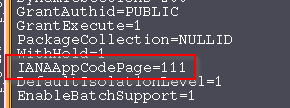
This error is caused by the metadata database DSN in the odbc.ini file having a setting for the database code page that does not match the actual code page used by the database. The code page functionality in Windows is more robust and can automatically adjust to use the correct code page, while in UNIX/Linux, it must be specified explicitly.
 
ACTION:
1. Obtain the correct database code page setting from the database administrator, and correct the "IANAAppCodePage=" setting for the metadata DSN in the odbc.ini file as shown below.

ka0PW0000000v37YAA_0EM4400000029Pc.png

2. Or We can also update the add CharacterSet parameter in odbc.ini file. 
For example, when using Teradata as Metadata, we can add following line to the metadata DSN in the odbc.ini file:
CharacterSet=UTF8


Comment

0 comments

Details

Knowledge Article

Published:

April 11, 2017

Last Updated:

February 26, 2024