EducationSoftwareStrategy.com
StrategyCommunity

Knowledge Base

Product

Community

Knowledge Base

TopicsBrowse ArticlesDeveloper Zone

Product

Download SoftwareProduct DocumentationSecurity Hub

Education

Tutorial VideosSolution GalleryEducation courses

Community

GuidelinesGrandmastersEvents
x_social-icon_white.svglinkedin_social-icon_white.svg
Strategy logoCommunity

© Strategy Inc. All Rights Reserved.

LegalTerms of UsePrivacy Policy
  1. Home
  2. Topics

KB47004: "MicroStrategy 9.4 Desktop Files has stopped working" error message appears when closing MicroStrategy Developer 9.4.1 after using Job Monitor


Stefan Zepeda

Salesforce Solutions Architect • Strategy


"MicroStrategy 9.4 Desktop Files has stopped working" error message appears when closing MicroStrategy Developer 9.4.1 after using Job Monitor

SYMPTOM:
 
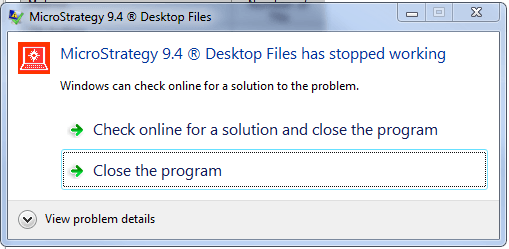
In Strategy Developer 9.4.1, after using the Job Monitor, when a user exits Developer, they receive a "Strategy 9.4 Desktop Files has stopped working" error message, as seen below:
 

ka02R000000kYRMQA2_0EM440000002CJp.png

 
After clicking "Close the program", this same error message will usually pop up again. However, this does not affect normal use of Developer since this error will only occur upon exit.
 
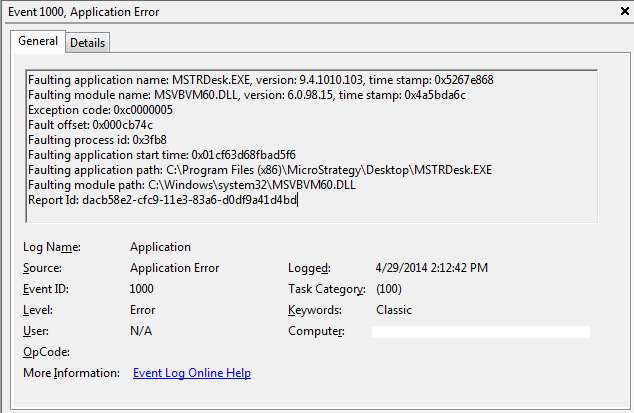
In the Windows Event Viewer, the following event is seen:
 

ka02R000000kYRMQA2_0EM440000002CJo.png

 
CAUSE:
 
This is a known issue in Strategy Developer 9.4.1.
 
ACTION:
 
Contact Strategy Technical Support for an update on this issue.


Comment

0 comments

Details

Knowledge Article

Published:

June 8, 2017

Last Updated:

June 8, 2017