EducationSoftwareStrategy.com
StrategyCommunity

Knowledge Base

Product

Community

Knowledge Base

TopicsBrowse ArticlesDeveloper Zone

Product

Download SoftwareProduct DocumentationSecurity Hub

Education

Tutorial VideosSolution GalleryEducation courses

Community

GuidelinesGrandmastersEvents
x_social-icon_white.svglinkedin_social-icon_white.svg
Strategy logoCommunity

© Strategy Inc. All Rights Reserved.

LegalTerms of UsePrivacy Policy
  1. Home
  2. Topics

KB47011: Border color selection for a grid display show none by default even though there are colors selected in MicroStrategy Web 9.x.


Community Admin

• Strategy


SYMPTOM:
 
When a header is selected in a grid and advanced formatting setting is opened the color for the border is set to 'none' by default. The visual display of the grid shows there is in fact a default color for the borders.
 
STEPS TO REPRODUCE:
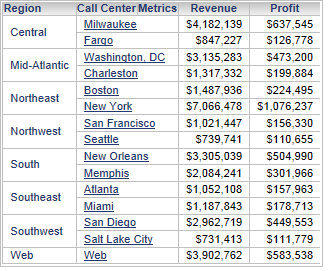
  • Create a document with a grid in Strategy web
ka04W000000OaZVQA0_0EM44000000265L.png
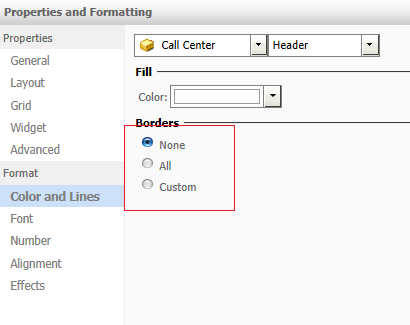
  • Right click on one of the headers and select "Advanced formatting" and naviage to "Color and Lines"
ka04W000000OaZVQA0_0EM44000000265I.png
  • The default selection for the borders is none even though there appears to be a gray border.

 
CAUSE:
 
This is a known issue in Strategy Web 9.x.
 
ACTION:
 
This issue is not scoped for any upcoming release.


Comment

0 comments

Details

Knowledge Article

Published:

July 11, 2017

Last Updated:

July 11, 2017