EducationSoftwareStrategy.com
StrategyCommunity

Knowledge Base

Product

Community

Knowledge Base

TopicsBrowse ArticlesDeveloper Zone

Product

Download SoftwareProduct DocumentationSecurity Hub

Education

Tutorial VideosSolution GalleryEducation courses

Community

GuidelinesGrandmastersEvents
x_social-icon_white.svglinkedin_social-icon_white.svg
Strategy logoCommunity

© Strategy Inc. All Rights Reserved.

LegalTerms of UsePrivacy Policy
  1. Home
  2. Topics

KB47038: When changing grid column width by dragging column in Editable mode and using pixels as measurement unit, tooltip shows number of inches instead of pixels in MicroStrategy Web


Community Admin

• Strategy


This knowledge base article explains that when changing grid column width by dragging column in Editable mode and using pixels as measurement unit, tooltip shows number of inches instead of pixels in MicroStrategy Web 9.3.1. This is due to a known issue.

SYMPTOM:
 
When changing grid column width by dragging column in Editable mode and using pixels as measurement unit, tooltip shows number of inches instead of pixels in Strategy Web 9.3.1.
 
In Strategy Web Preferences, measurement units can be set to Pixels under Project Defaults > General > Language.
 

ka04W000000Oe13QAC_0EM44000000265C.png

 
With this setting set to Pixels, running a document with a grid in Editable mode and then dragging the column to change the width allows a tooltip appear. This tooltip has the "Pixels" label but the number still represents inches, as shown in the screenshot.
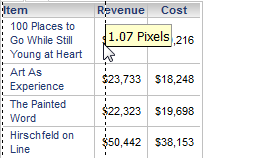
 

ka04W000000Oe13QAC_0EM44000000265E.png

 
CAUSE:
 
This is a known issue with Strategy 9.3.1.
 
ACTION:
 
Contact Strategy Technical Support for an update on this issue.


Comment

0 comments

Details

Knowledge Article

Published:

June 14, 2017

Last Updated:

June 14, 2017