EducationSoftwareStrategy.com
StrategyCommunity

Knowledge Base

Product

Community

Knowledge Base

TopicsBrowse ArticlesDeveloper Zone

Product

Download SoftwareProduct DocumentationSecurity Hub

Education

Tutorial VideosSolution GalleryEducation courses

Community

GuidelinesGrandmastersEvents
x_social-icon_white.svglinkedin_social-icon_white.svg
Strategy logoCommunity

© Strategy Inc. All Rights Reserved.

LegalTerms of UsePrivacy Policy
  1. Home
  2. Topics

KB47043: Null data is seen when using Data Import on a file storing datetime values in the ISO 8601 standard and setting Data Import to handle them as dates in MicroStrategy 10


Community Admin

• Strategy


This article notes an issue with ISO standard datetimes with data import

SYMPTOM:
Null data is seen in a report/dashboard based off of a Data Import cube set to use an ISO 8601 containing column as datetime instead of string. Example data is seen in the screenshot below.
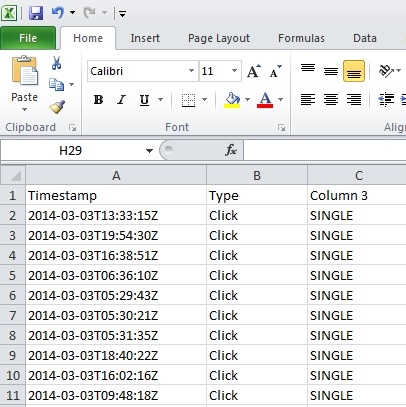
ka04W000000OhHKQA0_0EM440000002CMc.jpeg


2014-03-03T13:33:15Z

 
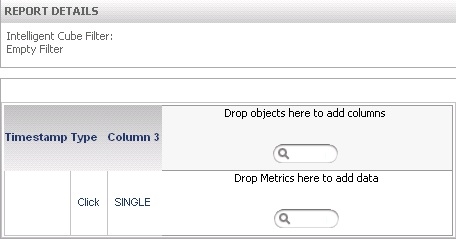
A report built off of the cube looks like the below when the column is set as datetime.

ka04W000000OhHKQA0_0EM440000002CMb.jpeg

 
If left as string in Data Import then the data can be seen but not reformatted as seen below.
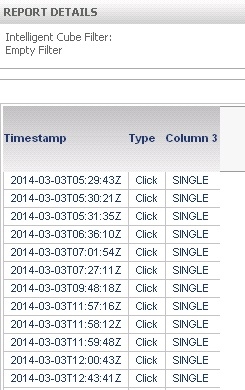
ka04W000000OhHKQA0_0EM440000002CMk.jpeg

 
CAUSE:
This is a known issue with Strategy 9.x.
 
ACTION:
Currently this issue is still being reviewed for feasibility by our Technology team and it is not scoped for any upcoming scheduled Strategy release. 
 
WORKAROUND:
The simplest workaround is to edit the source file to not store the datetime values in that format.


Comment

0 comments

Details

Knowledge Article

Published:

May 26, 2017

Last Updated:

May 26, 2017