There may be a scenario when a user wants to convert a column returning second values and convert it to a timestamp. This article incorporates formatting considerations as well as subtotaling and dynamic aggregation considerations for a timestamp metric that uses the out-of-the-box Strategy functions.
Strategy has three functions: Hour, Minute, and Second. These functions will pull the respective components from a timestamp value and return an integer for the hour, minute, or second components of a timestamp. There may be scenarios where converting a metric with just seconds into correct hours, minutes, and seconds are necessary.
LOGIC:
For the purposes of this article, the metric containing second data returning an integer value will be denoted as "X". Note it is important that this metric is not based on a string column and based on a number column.
There are three possible outputs for a timestamp which can be used and vary depending on the number of seconds:
Depending on individual needs and the number of seconds returned, a user can use the first output for second values less than 3600, the second output for second values less than 86,400, and the third output for all others.
The following sections contain metric definitions that will properly calculate the values depending on the output chosen.
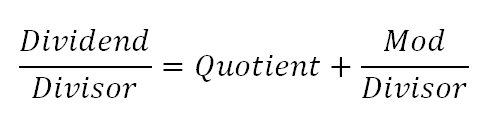
For the base logic, two out-of-the-box Strategy functions will be used: Quotient and Mod. Mod (or modulus) is equivalent to the remainder. Their function definitions are as follows:
Mod(Argument, Divisor)
Quotient(Numerator, Denominator)
A diagram of how these functions fit together with the dividend and divisor is as follows:
OUTPUT 1:
To return only minutes and seconds, create two metrics defined as follows:
If X was 500, each metric would calculate as follows:
Minutes: Quotient(500,60) = 8
Seconds: Mod(500,60)=20
Based on the above, the values returned are 8 minutes and 20 seconds..
OUTPUT 2:
To return hours, minutes, and seconds, create three metrics defined as follows:
If X was 3715, each metric would calculate as follows:
Hours: Quotient(3715,3600)=1
Minutes: Quotient(Mod(X,3600),60)=Quotient(115,60)=1
Seconds: Mod(Mod(X,3600),60)=Mod(115,60)=55
Based on the above, the values returned are 1 hour, 1 minute and 55 seconds.
OUTPUT 3:
To return days, hours, minutes, and seconds, create four metrics defined as follows:
If X was 100000, each metric would calculate as follows:
Days: Quotient(100000,86400)=1
Hours: Quotient(Mod(100000,86400),3600)=Quotient(13600,3600)=3
Minutes: Quotient(Mod(Mod(100000,86400),3600),60)=Quotient(Mod(13600,3600),60)=Quotient(2800,60)=46
Seconds: Mod(Mod(Mod(X,86400),3600),60)=Mod(Mod(13600,3600),60)=Mod(2800,60)=40
Based on the above, the values returned are 1 day, 3 hours, 46 minutes and 40 seconds.
FORMATTING CONSIDERATIONS:
Each metric on its own will return the appropriate values for the components of the timestamp, but one may want to merge the calculation into one metric column. This can be done using the Concat function in Strategy, which is defined as follows:
Concat(Argument1, Argument2, ..., ArgumentN)
Each argument represents either a fact, metric, column, or string value.
The Concat function can be used in each output scenario as follows:
This returned correct results that could be subtotaled and could dynamically aggregate by replacing Days, Hours, Minutes, and Seconds with their appropriate formulas listed in the output sections above.
For each of the scenarios outlined above (500 seconds, 3715 seconds, and 100000 seconds), the concatenation function will behave as follows:
This is not ideal as it is common to see a 0 in front of these values if the values are less than 9. In order to display the 0 in front of each individual metric, the Case function must be used with another Concat function. The definition for Case is as follows:
Case(Condition1, ReturnValue1, Condition2, ReturnValue2, ..., DefaultValue)
Each condition is a qualification composed of metrics, comparison and logical operators, and constants. It's corresponding ReturnValue will return the value if the condition is satisfiedd. Otherwise, the default value will be returned.
To use this to display values correctly, the following syntax will be needed:
Replacing each corresponding metric with the above expressions will return the following:
The metrics should be built as follows for each of the three output scenarios expanded in terms of Days, Hours, Minutes, and Seconds:
The metrics in terms of X should be built as follows:
From here, every instance of X can be replaced with the appropriate metric name by using a text editor and using Find/Replace. Include square brackets around the metric name if it is more than 1 word.
SUBTOTALING AND DYNAMIC AGGREGATION:
When using any of the metrics (in terms of X) above and ensure that they are smart metrics, the Analytical Engine will perform subtotaling on the base metric X before performing the concatenation, so all out-of-the-box subtotals will work.
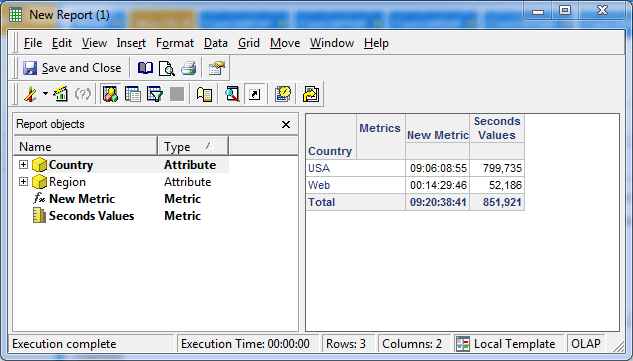
Dynamic aggregation will also apply as well in this scenario, since the subtotal is being calculated on the raw data before any other calculation by default.
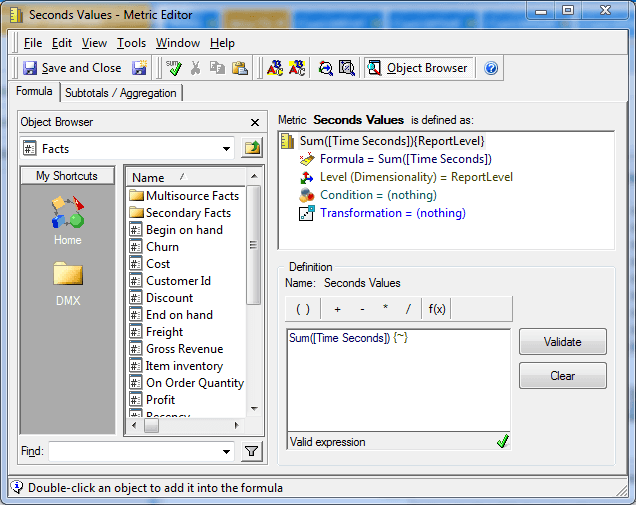
An example is provided to demonstrate both. A metric has been defined as the sum of a time fact at the report level:
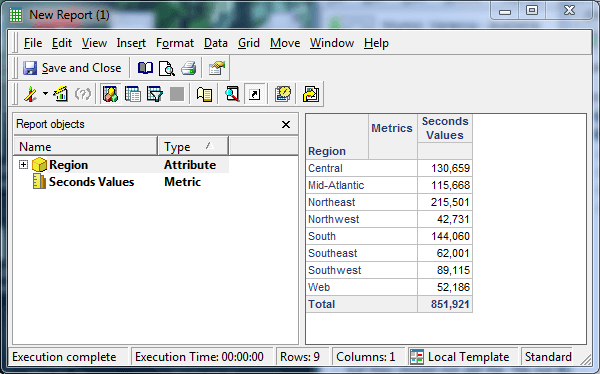
Included in a report with the Region attribute will look like this:
After this, a derived metric is added to the report that is defined as follows (this is using the third output scenario):
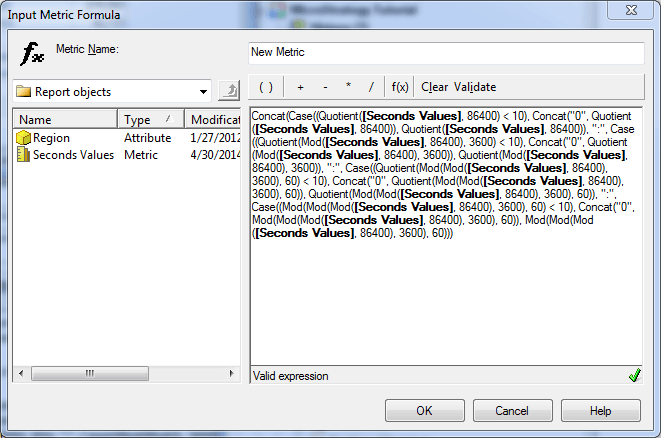
Here is how the formula calculates these values:
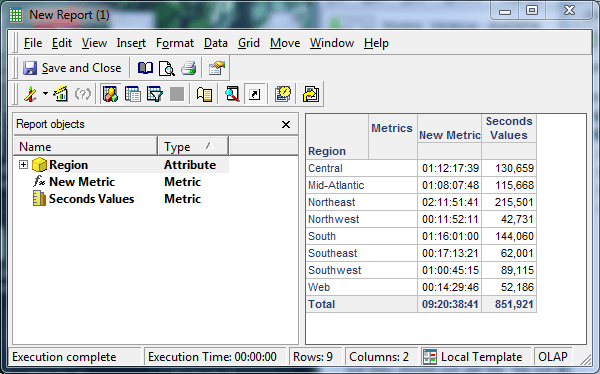
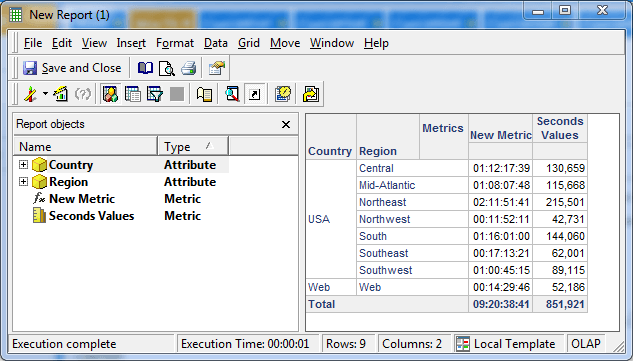
Using a conversion tool available on the Internet, it is easy to verify that 851921 seconds is 9 days, 20 hours, 38 minutes, and 41 seconds.
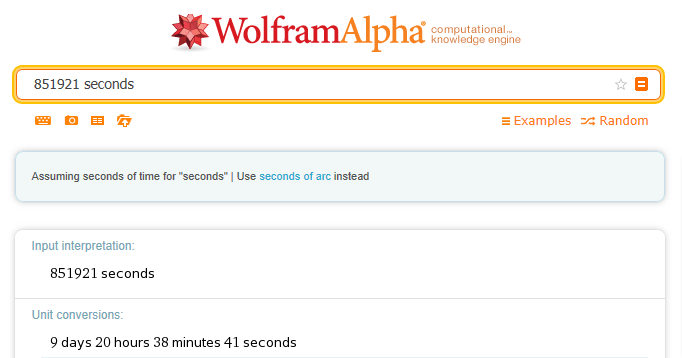
For purposes of demonstrating dynamic aggregation, Country is added to the report:
If Region is removed from the template, the values will dynamically aggregate:
Note: The timestamp metric can be either a derived metric or a smart standalone metric.
WARNING:
The third-party product(s) discussed in this article is manufactured by vendors independent of Strategy. Strategy makes no warranty, express, implied or otherwise, regarding this product, including its performance or reliability.
