EducationSoftwareStrategy.com
StrategyCommunity

Knowledge Base

Product

Community

Knowledge Base

TopicsBrowse ArticlesDeveloper Zone

Product

Download SoftwareProduct DocumentationSecurity Hub

Education

Tutorial VideosSolution GalleryEducation courses

Community

GuidelinesGrandmastersEvents
x_social-icon_white.svglinkedin_social-icon_white.svg
Strategy logoCommunity

© Strategy Inc. All Rights Reserved.

LegalTerms of UsePrivacy Policy
  1. Home
  2. Topics

KB47069: Column pattern for columns with lowercase letters is different than column pattern setting for a database instance using the "Denodo 5.0" connector in MicroStrategy Developer 9.4.x and 10.x


Stefan Zepeda

Salesforce Solutions Architect • Strategy


If using the "Denodo 5.0" connector with MicroStrategy provided as part of the post-certification of Denodo, columns with lowercase characters may have a different column pattern than other columns. In this particular scenario, the grave accent character is placed around all columns with lowercase characters as well as their respective column aliases.

SYMPTOM:
 
If using the "Denodo 5.0" connector with Strategy provided as part of the post-certification of Denodo, columns with lowercase characters may have a different column pattern than other columns. In this particular scenario, the grave accent character is placed around all columns with lowercase characters as well as their respective column aliases.
 
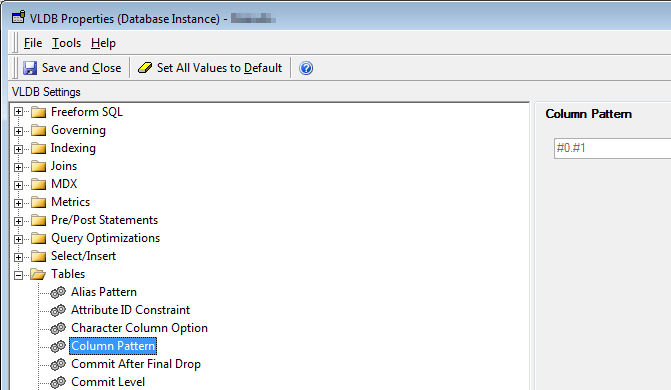
As seen below, the Column Pattern advanced VLDB property is set to default, "#0.#1" without the quotes.
 

ka02R000000kcaYQAQ_0EM440000002CMo.png

 
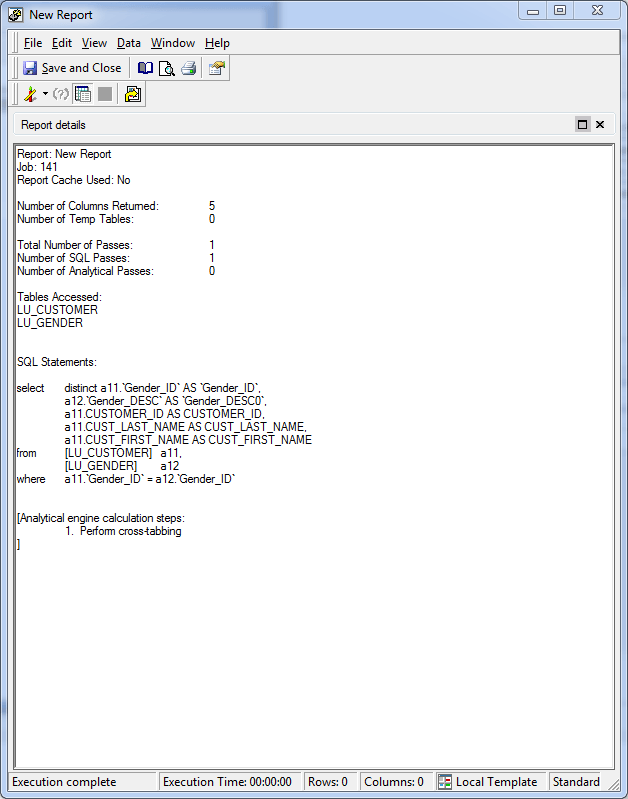
Despite this setting being set to default, the SQL places grave accents outside of the column names as well as their respective lowercase column aliases. Here is an example of the SQL: 
 

ka02R000000kcaYQAQ_0EM440000002CMn.png

 
ACTION:
 
Contact Strategy Technical Support about the latest status of this.


Comment

0 comments

Details

Knowledge Article

Published:

April 11, 2017

Last Updated:

April 11, 2017