EducationSoftwareStrategy.com
StrategyCommunity

Knowledge Base

Product

Community

Knowledge Base

TopicsBrowse ArticlesDeveloper Zone

Product

Download SoftwareProduct DocumentationSecurity Hub

Education

Tutorial VideosSolution GalleryEducation courses

Community

GuidelinesGrandmastersEvents
x_social-icon_white.svglinkedin_social-icon_white.svg
Strategy logoCommunity

© Strategy Inc. All Rights Reserved.

LegalTerms of UsePrivacy Policy
  1. Home
  2. Topics

KB47088: "Cannot delete ‘metric name’ because other objects depend on it" error message appears when attempting to delete a metric which is not seen in the any report/document definition in MicroStrategy Developer 9.4.1


Stefan Zepeda

Salesforce Solutions Architect • Strategy


"Cannot delete ‘metric name’ because other objects depend on it" error message appears when attempting to delete a metric which is not seen in the any report/document definition in MicroStrategy Developer 9.4.1

SYMPTOM:
 
"Cannot delete ‘metric name’ because other objects depend on it" error message appears when attempting to delete a metric which is not seen in the any report/document definition in Strategy Developer 9.4.1. But, the dependents search returns some documents.
 
The following steps demonstrate how to reproduce the issue in Strategy Tutorial project:
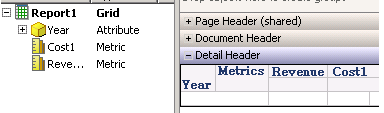
    1. Create metric Cost1.
    2. Create report Report1 with Year, Revenue and Cost1.
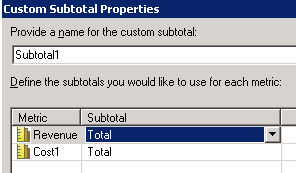
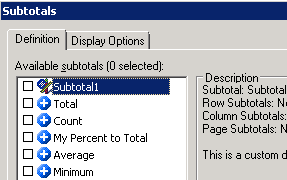
    3. Create document Document1 with this report as dataset. Insert grid with Cost1, Revenue and Year. Create custom subtotal Subtotal1 on this grid as shown below:


ka02R000000kbogQAA_0EM440000002CMx.png


ka02R000000kbogQAA_0EM440000002CMe.png


ka02R000000kbogQAA_0EM440000002CMt.png


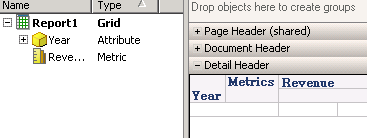
    1. Remove metric Cost1 from dataset Report1 successfully without any warning. Edit Document1 and remove Cost1 from grid as shown below:


ka02R000000kbogQAA_0EM440000002CMw.png


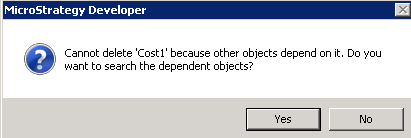
    1. Save the document changes and atempt to delete Cost1. Error message appears as shown below:


ka02R000000kbogQAA_0EM440000002CMu.png

 
Cannot delete ‘Cost1’ because other objects depend on it. Do you want to search the dependent objects?
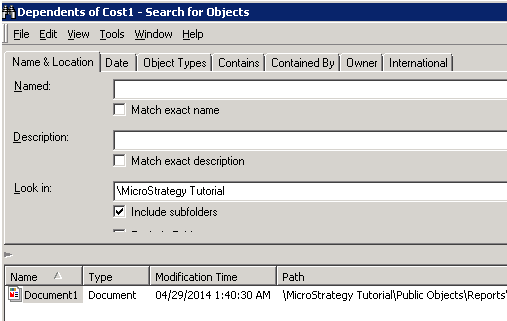


    1. Click on "Yes" to search the dependent objects. Document1 still appears in the list as shown below:


ka02R000000kbogQAA_0EM440000002CMq.png

 
CAUSE:
 
This is a known issue in Strategy Developer 9.4.1. The metric is not removed from custom subtotal definition even though the metric is removed from grid and dataset. This causes document still depend on the metric.
 
ACTION:
 
Please contact Strategy Technical Support for the latest update on this issue.
 
WORKAROUND:
 
Edit and check each grid in the document. Delete old custom subtotal and create new custom subtotal instead.


Comment

0 comments

Details

Knowledge Article

Published:

June 8, 2017

Last Updated:

June 8, 2017