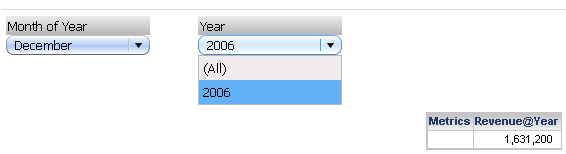
SYMPTOM
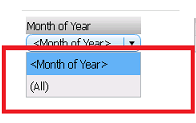
In Strategy Analytics Enterprise 9.4.1, if the slicing selector attribute is not in the level of the level metric on the grid or does not have dataset relationship, though is related in schema with the level of metric, it does not show any elements in the element list.
STEPS TO REPRODUCE
CAUSE
In Strategy Analytics Enterprise 9.4.1, this different behavior is introduced by new enhanced pushdown logic which takes the relationship with metric’s original level into consideration. When running a document, Strategy generates a runtime template for the grid in the back end. If the slicing attribute is not on the grid, the logic to decide whether or not to push the selector attribute to the runtime template, has been altered in Strategy Analytics Enterprise 9.4.1.
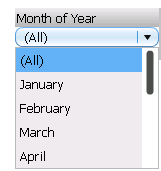
In Strategy versions prior to 9.4.1, as long as the slicing selector attribute is in dataset reports it will be pushed down to the runtime template. In the given example, the level metric in this grid is defined at the Year level so it cannot actually be pushed down to Month of Year Level. Though elements show up in the selector, actually the Month of Year selector is not controlling the grid. Whatever element picked in the selector, the grid data remains same.
In Strategy Analytics Enterprise 9.4.1, the logic has changed so as to avoid the above appear-to-control symptom. The selector attribute is pushed down to the runtime template only when it is related with the metric’s original level which is {Year} in the example. Month of Year and Year are both the parent of Month, and they are considered as having sibling relation only when Month is included in the dataset. Otherwise they have no schema relationship, which means they don’t belong to the same hierarchy. As a result they are treated as unrelated and hence the Month of Year attribute is not pushdown into runtime template.
WORKAROUND
Method A
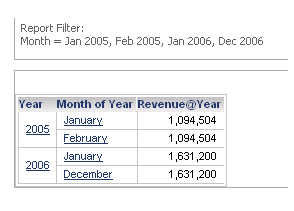
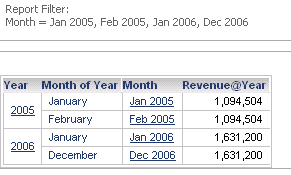
Add the Month attribute to the dataset. This establishes the sibling relation between the attributes Year and Month of Year as shown below:
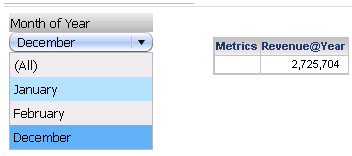
Method B
The selector design can be modified as explained below:
1. Year slicing selector target the metric only grid
2. Month of Year slicing selector target Year selector and grid
With this, for month of year January, Year would have 2005 and 2006;
For February, Year would have 2005;
For December, Year would have 2006.