EducationSoftwareStrategy.com
StrategyCommunity

Knowledge Base

Product

Community

Knowledge Base

TopicsBrowse ArticlesDeveloper Zone

Product

Download SoftwareProduct DocumentationSecurity Hub

Education

Tutorial VideosSolution GalleryEducation courses

Community

GuidelinesGrandmastersEvents
x_social-icon_white.svglinkedin_social-icon_white.svg
Strategy logoCommunity

© Strategy Inc. All Rights Reserved.

LegalTerms of UsePrivacy Policy
  1. Home
  2. Topics

KB47099: In MicroStrategy Analytics Enterprise 9.4.1, the child selector is not controlled by the parent Selector when the child selector targets a panel that has dynamic texts


Community Admin

• Strategy


This article describes an issue with selectors in 9.4.1

SYMPTOM
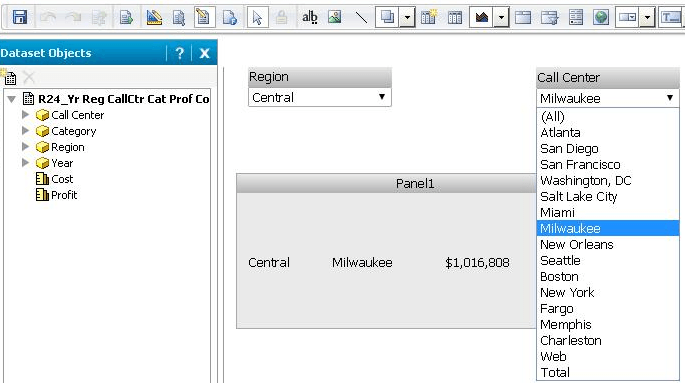
In Strategy Analytics Enterprise 9.4.1, when a parent slicing selector targets a child slicing selector and the child selector targets a panel that has some dynamic texts, all the elements are seen available in the child selector list no matter which element is selected on the parent selector. In other words, the parent selector has no control over the child selector.
 
STEPS TO REPRODUCE
The example below is based on the Strategy Tutorial project
In the document below, the Region selector only targets the Call Center selector. The child selector then targets the panel with the dynamic texts: {Region}, {Call Center} and {Cost} as shown below:

ka04W000000Oha7QAC_0EM440000002CJr.png

 
After executing the document, Call Center selector elements are not trimmed by the selection on the Region selector as shown below:
ka04W000000Oha7QAC_0EM440000002CJq.png


CAUSE
This is a known issue in Strategy Analytics Enterprise 9.4.1.
 
ACTION
This issue has been fixed in Strategy Analytics Enterprise 9.4.1 Hotfix 3. Upgrade to this version or a newer release to take advantage of the fix.
 
WORKAROUND
One of the following methods can be used as a workaround for this issue. 

  • Make the parent selector target the same objects as the child selector.
  • Replace the child selector with a grid containing only with the child selector source attribute. The data source of the grid is the same as that of the target(s). Use the attribute as a selector.
  • Change the parent selector from a slicer to a filter selector. Right mouse click the parent selector to open Properties and Formatting window, go to Selector Tab and then check the "Apply selections as a filter" option.  Dashboard in off-line Flash or mobile devices are not available once applying this workaround.


Comment

0 comments

Details

Knowledge Article

Published:

May 12, 2017

Last Updated:

May 12, 2017