Scenario explanation:
A dataset has the following design:
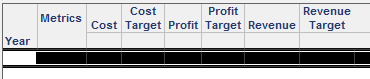
Each metric is paired:
The dataset is included in a document, with a metric selector. When a metric is selected, the metric selector should also select the target portion of each metric pair - applying the metric and the metric target.
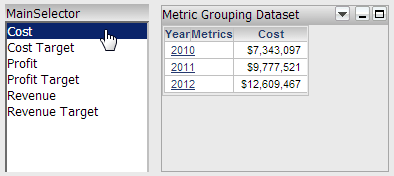
This is not possible out of the box. To achieve this scenario in a customization, an add-on is created for the rwd(Report Writing Documents) page. There are three goals of this customization:
Finding the current selection
We can verify which selector elements are selected, using the example provided in the following Technical Note:
TN 47108: How to determine which selector element has been selected using the MicroStrategy Web SDK 9.4.1
Hiding the "Target" metric from each pair
To control which metrics are shown in the selector, a panel stack with a second grid and selector is created, and the main selector is set to target this panel stack. The second grid only contains the metrics we want to show in our selector:
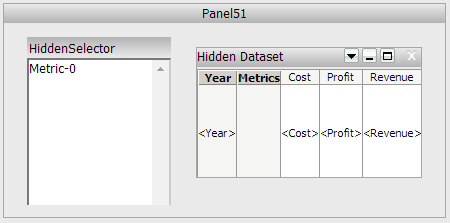
Since the main selector targets a panelstack containing the hidden dataset with only 3 metrics, only these three metrics are shown in the selector.
Note: To hide the panel from view, select the “Use as Information Window” option in the panel properties and formatting.
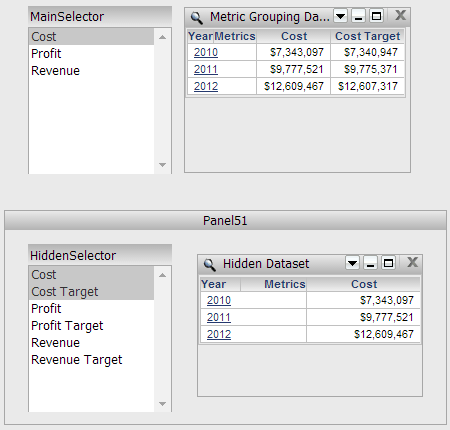
Also applying the "Target" metric when a metric is selected
Using the first part of the addon described above, the main selector is checked to see which metric has been selected. This selection is used to determine what selection the hidden selector should have, which is then applied to our main grid.
Custom selections can be applied within the addon, using RequestKeys. For example:
        RequestKeys frameKeys = new GenericRequestKeys();
        frameKeys.add("evt", "2048084");
        frameKeys.add("src", "mstrWeb.rwd.rwframe.rwb.2048084");
        frameKeys.add("ctlKey", hiddenKey);
        frameKeys.add("unitKeyContext", hiddenContext);
        frameKeys.add("applyNow", "1");
        frameKeys.add("selectorMode", "1");
        frameKeys.add("usePartDisplay", "1");
        frameKeys.add("currentIncludeState", "true");
        frameKeys.add("elemList", "i408B014D40C9AC4F72F6B3845F3F7D76;408B014D40C9AC4F72F6B3845F3F7D76"); // Cost
frameKeys.add("elemList", "i0544CBA3418F83792ADB60B57F6A89CD;0544CBA3418F83792ADB60B57F6A89CD"); // Cost Targetpage.handleRequest(frameKeys);
Full code sample:
/**
 * Strategy SDK Sample
 *
 * Copyright © 2011 Strategy Incorporated. All Rights Reserved.
 *
 * Strategy MAKES NO REPRESENTATIONS OR WARRANTIES ABOUT THE
 * SUITABILITY OF THIS SAMPLE CODE, EITHER EXPRESS OR IMPLIED, INCLUDING
 * BUT NOT LIMITED TO THE IMPLIED WARRANTIES OF MERCHANTABILITY, FITNESS
 * FOR A PARTICULAR PURPOSE, OR NON-INFRINGEMENT. Strategy SHALL NOT
 * BE LIABLE FOR ANY DAMAGES SUFFERED BY LICENSEE AS A RESULT OF USING,
 * MODIFYING OR DISTRIBUTING THIS SAMPLE CODE OR ITS DERIVATIVES.
 *
 *
 */
package com.techsupp;
import java.util.List;
import com.Strategy.web.app.addons.AbstractAppAddOn;
import com.Strategy.web.app.beans.PageComponent;
import com.Strategy.web.beans.GenericRequestKeys;
import com.Strategy.web.beans.RWBean;
import com.Strategy.web.beans.RequestKeys;
import com.Strategy.web.objects.rw.EnumRWUnitTypes;
import com.Strategy.web.objects.rw.RWData;
import com.Strategy.web.objects.rw.RWDefinition;
import com.Strategy.web.objects.rw.RWGroupByElements;
import com.Strategy.web.objects.rw.RWInstance;
import com.Strategy.web.objects.rw.RWSelectorControlObject;
import com.Strategy.web.objects.rw.RWUnitDef;

public class GroupMetricSelectors extends AbstractAppAddOn {

	public String getAddOnDescription() {

		return "Groups selectors for metric pairs";
	}

	public void postCollectData(PageComponent page) {

		System.out.println("Called Post Collect");
		try {
			RWBean rwb = (RWBean) page.getChildByClass(RWBean.class);
			System.out.println("DocumentID: " + rwb.getObjectID());

			if (!rwb.getObjectID().equals("D24F884E44501B2DBA574DA6EDC75578")) return; // We only want this to happen for this specific document, not other documents.

			System.out.println("This is our document");
			RWInstance inst = rwb.getRWInstance();
			RWData data = inst.getData();
			RWDefinition def = inst.getDefinition();

			String visibleKey = null;
			String visibleContext = null;
			String visibleControl = "MainSelector"; // enter the name of the selector to be accessed here
			String hiddenKey = null;
			String hiddenContext = null;
			String hiddenControl = "HiddenSelector"; // Name of the hidden selector

			RWUnitDef[] units = def.findUnitsByType(EnumRWUnitTypes.RWUNIT_CONTROL);

			// Obtain key for selector with the name that matches the string for both controls
			for (int i = 0; i < units.length; i++) {

				System.out.println("units=" + units.getName());

				if (units.getName().equals(visibleControl)) {
					visibleKey = units.getKey();
					visibleContext = units.getKeyContext();
					System.out.println("visibleKey=" + visibleKey);
				}

				if (units.getName().equals(hiddenControl)) {
					hiddenKey = units.getKey();
					hiddenContext = units.getKeyContext();
					System.out.println("hiddenKey=" + hiddenKey);
					System.out.println("hiddenContext=" + hiddenContext);
				}
			}

			List list = data.findUnits(visibleKey);

			RWSelectorControlObject selectorObj = (RWSelectorControlObject) list.get(0);

			// Retrieve list of elements in the selector
			RWGroupByElements selectorElements = selectorObj.getElements();

			// Begin preparing the request to apply our custom selections
			RequestKeys frameKeys = new GenericRequestKeys();
			frameKeys.add("evt", "2048084");
			frameKeys.add("src", "mstrWeb.rwd.rwframe.rwb.2048084");
			frameKeys.add("ctlKey", hiddenKey);
			frameKeys.add("unitKeyContext", hiddenContext);
			frameKeys.add("applyNow", "1");
			frameKeys.add("selectorMode", "1");
			frameKeys.add("usePartDisplay", "1");
			frameKeys.add("currentIncludeState", "true");

			boolean customSelection = false;

			if (selectorElements.get(0).isCurrent()) {

				// The first element (Cost) has been selected in the metric selector
				customSelection = true;
				System.out.println("Cost is selected");

				// We're defining the selections that should be active. We need to include both metrics.
				// Cost:
				frameKeys.add("elemList", "i408B014D40C9AC4F72F6B3845F3F7D76;408B014D40C9AC4F72F6B3845F3F7D76");
				// Cost Target:
				frameKeys.add("elemList", "i0544CBA3418F83792ADB60B57F6A89CD;0544CBA3418F83792ADB60B57F6A89CD");

			} else if (selectorElements.get(1).isCurrent()) {
				customSelection = true;
				System.out.println("Profit is selected");

				// Profit:
				frameKeys.add("elemList", "iD662DA9B4A60D323367530B9490A42BE;D662DA9B4A60D323367530B9490A42BE");

				// Profit Target:
				frameKeys.add("elemList", "i90948C1E4719802EF916E18385920D89;90948C1E4719802EF916E18385920D89");
			} else if (selectorElements.get(2).isCurrent()) {

				customSelection = true;
				System.out.println("Revenue is selected");

				// Revenue:
				frameKeys.add("elemList", "i21F20AF84C9214A686ED288851C040EF;21F20AF84C9214A686ED288851C040EF");

				// Revenue Target
				frameKeys.add("elemList", "iDC29D72B49BC9E0B7E5EAA84793BFA98;DC29D72B49BC9E0B7E5EAA84793BFA98");
			}

			// Only apply our custom selections if needed
			if (customSelection) page.handleRequest(frameKeys);

		} catch (Exception e) {
			e.printStackTrace();
			System.out.println(e.toString());
		}
		return;
	}
}
PREREQUISITES:
For the sample to work, the Strategy Web JAR files must be accessible by the Java Runtime
Environment. The Strategy Web JAR files can be found under:
ADDITIONAL INFORMATION:
The Strategy SDK allows you to customize the standard Strategy Web interface, and extend and integrate the Strategy business intelligence functionality into other applications. However, before changing the way Strategy Web products look or behave, it is helpful to understand how the application is built. For more information regarding the Strategy Web architecture or the process of customizing Strategy Web, please refer to Strategy Developer Zone (https://community.strategy.com/topic/0TO44000000FliLGAS/sdk).
To access the Strategy Developer Zone, you must have access to the Strategy Knowledge Base, you must have purchased the Strategy SDK, and you must be current on your Strategy maintenance agreement. If you are a US-based business and believe that you satisfy all three of these conditions but you do not have access to the Strategy Developer Zone, please contact Strategy Technical Support at support@microstrategy.com or at (703) 848-8700. If you are an international business, please contact Strategy Technical Support at the appropriate email address or phone number found at https://www.microstrategy.com/en/support/contact-support.
CUSTOMIZATION WARNING:
This customization is provided as a convenience to Strategy users and is only directly applicable to the version stated. While this code may apply to other releases directly, Strategy Technical Support makes no guarantees that the code provided will apply to any future or previous builds. In the event of a code change in future builds, Strategy Technical Support makes no guarantee that an updated version of this particular customization will be provided. In the event of a code change in future builds, Strategy may not be able to provide additional code on this matter even though this customization is provided at this time for this specific build. For enhancements to this customization or to incorporate similar functionality into other versions, contact your Account Executive to inquire about Strategy Consulting assistance.
