EducationSoftwareStrategy.com
StrategyCommunity

Knowledge Base

Product

Community

Knowledge Base

TopicsBrowse ArticlesDeveloper Zone

Product

Download SoftwareProduct DocumentationSecurity Hub

Education

Tutorial VideosSolution GalleryEducation courses

Community

GuidelinesGrandmastersEvents
x_social-icon_white.svglinkedin_social-icon_white.svg
Strategy logoCommunity

© Strategy Inc. All Rights Reserved.

LegalTerms of UsePrivacy Policy
  1. Home
  2. Topics

KB47132: Column width cannot be resized by dragging in Flash Mode when row headers are locked in MicroStrategy Web 9.4.1


Community Admin

• Strategy


In MicroStrategy Web 9.4.1, users have the ability to drag the border of a column cell to adjust the width in Flash Mode. However, this feature does not work when Row Headers are locked for the grid. The icon to drag appears, but is not functional

SYMPTOM:
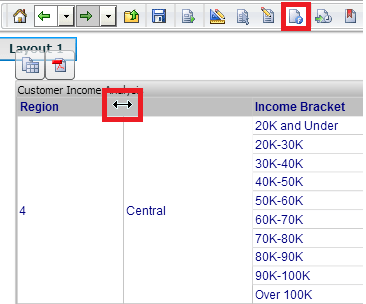
In Strategy Web 9.4.1, users have the ability to drag the border of a column cell to adjust the width in Flash Mode. However, this feature does not work when Row Headers are locked for the grid. The icon to drag appears, but is not functional, as shown below:
ka04W000000OhJtQAK_0EM44000000267p.png

 
This issue does not occur in Editable Mode or in Interactive Mode.
 
STEPS TO REPRODUCE: 
 
To reproduce the issue, follow these steps:
  • Create a document with a grid report in Strategy Web 9.4.1.
  • Execute the document in Flash Mode. Notice the columns can be resized by dragging.
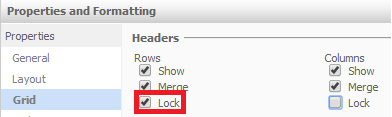
  • In Editable Mode, go to Properties & Formatting > Grid, and lock the row headers, as shown below:
ka04W000000OhJtQAK_0EM44000000267r.png
  • Notice in Editable Mode, the column widths can still be resized by dragging.
  • Switch back to Flash Mode. Notice that it is no longer possible to resize column widths by dragging.

CAUSE:
This is a known issue in Strategy Web 9.4.1.
 
ACTION:
Contact Strategy Technical Note for an update regarding this issue.
 
WORKAROUND:
To work around this issue, there are the following options:

  1. Resize columns in Interactive Mode or Editable Mode instead of in Flash Mode.
  2. Do not lock Row Headers.

Comment

0 comments

Details

Knowledge Article

Published:

May 25, 2017

Last Updated:

May 25, 2017