EducationSoftwareStrategy.com
StrategyCommunity

Knowledge Base

Product

Community

Knowledge Base

TopicsBrowse ArticlesDeveloper Zone

Product

Download SoftwareProduct DocumentationSecurity Hub

Education

Tutorial VideosSolution GalleryEducation courses

Community

GuidelinesGrandmastersEvents
x_social-icon_white.svglinkedin_social-icon_white.svg
Strategy logoCommunity

© Strategy Inc. All Rights Reserved.

LegalTerms of UsePrivacy Policy
  1. Home
  2. Topics

KB47140: The MicroStrategy Mobile application launches to the last viewed page rather than the desired landing page document whenever re-opening MicroStrategy Mobile 9.x and 10.x


Community Admin

• Strategy


A MicroStrategy Mobile 9.x or 10.x app is configured to launch to a landing page document.  After navigating through links to different documents or views, the app is then closed.  When the app is re-opened the user is taken to the last viewed document rather than the desired landing page document.

SYMPTOM:
A Strategy Mobile 9.x or 10.x app is configured to launch to a landing page document.  After navigating through links to different documents or views, the app is then closed.  When the app is re-opened the user is taken to the last viewed document rather than the desired landing page document.
 
CAUSE:
This is working as designed.  The app will cache where the user last was so it can return to that spot when reopening.
ACTION:
There is a mobile configuration setting called "Clear caches when the application closes".  Enabling this setting will remove all the caches from the device when the app closes and will force the application to always default to the landing page document (if one is set) upon launching.
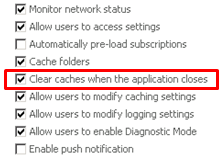
ka04W000001MKoAQAW_0EM440000002A5o.png

 
Additionally, this setting can be enabled directly within the Strategy Mobile application itself by going into the apps settings.

ka04W000001MKoAQAW_0EM440000002A5u.png

Comment

0 comments

Details

Knowledge Article

Published:

April 7, 2017

Last Updated:

April 7, 2017