EducationSoftwareStrategy.com
StrategyCommunity

Knowledge Base

Product

Community

Knowledge Base

TopicsBrowse ArticlesDeveloper Zone

Product

Download SoftwareProduct DocumentationSecurity Hub

Education

Tutorial VideosSolution GalleryEducation courses

Community

GuidelinesGrandmastersEvents
x_social-icon_white.svglinkedin_social-icon_white.svg
Strategy logoCommunity

© Strategy Inc. All Rights Reserved.

LegalTerms of UsePrivacy Policy
  1. Home
  2. Topics

KB47141: Data Load Scheduler in Enterprise Manager Console is grayed out in MicroStrategy 9.x


Community Admin

• Strategy


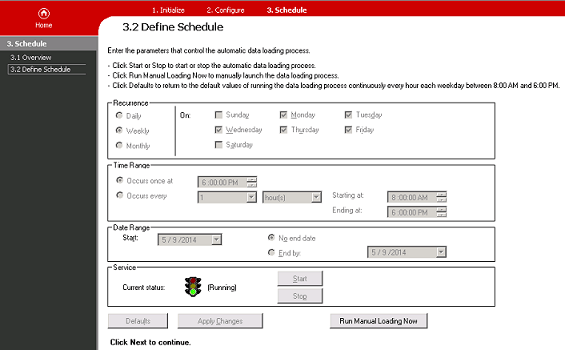
When trying to change the Enterprise Manager Data load schedule in the MicroStrategy Enterprise Manager console 9.x, all the options are grayed if the Windows user is not an administrator.

SYMPTOM
When trying to change the Enterprise Manager Data load schedule from Strategy Enterprise Manager console 9.x, all the options are grayed out:
ka04W000000OfW7QAK_0EM4400000029PY.png

 
CAUSE:
Strategy Enterprise Manager 9.x data load scheduler requires special administrative privileges on the Windows machine only available to administrators.
ACTION:
Windows users working with the Strategy Enterprise Manager 9.x console need to have administrator privileges.


Comment

0 comments

Details

Knowledge Article

Published:

March 31, 2017

Last Updated:

March 31, 2017