EducationSoftwareStrategy.com
StrategyCommunity

Knowledge Base

Product

Community

Knowledge Base

TopicsBrowse ArticlesDeveloper Zone

Product

Download SoftwareProduct DocumentationSecurity Hub

Education

Tutorial VideosSolution GalleryEducation courses

Community

GuidelinesGrandmastersEvents
x_social-icon_white.svglinkedin_social-icon_white.svg
Strategy logoCommunity

© Strategy Inc. All Rights Reserved.

LegalTerms of UsePrivacy Policy
  1. Home
  2. Topics

KB47145: “Failed to create the part’s controls” error is displayed when opening ‘folderViewMode’ which is under System Definition folder when using MicroStrategy Web Customization Editor in MicroStrategy Web 9.4.1


Community Admin

• Strategy


SYMPTOM:
 
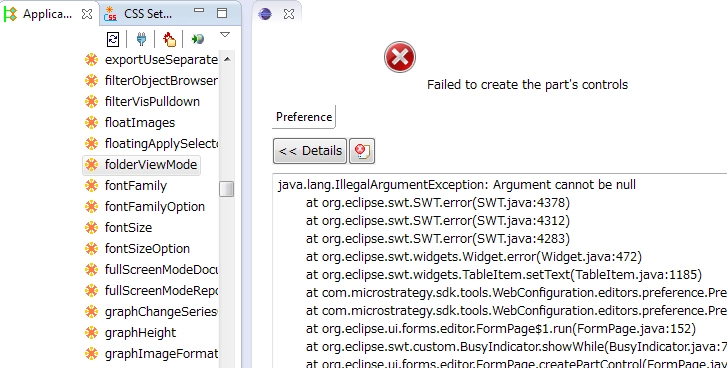
In Strategy Web 9.4.x, a “Failed to create the part’s controls” error is displayed when opening ‘folderViewMode’ which is under the System Definition folder when using the Strategy Web Customization Editor, as shown in the image below:
ka04W000000OdGKQA0_0EM440000002GW0.png

 
STEPS TO REPRODUCE:

  1. Open the Web Customization Editor in Eclipse.
  2. Navigate to the Strategy Web Configuration > Web Configuration Settings > System Definitions.
  3. Open the 'folderViewMode'. Note that the “Failed to create the part’s controls” error is displayed.

 
CAUSE:
 
This is a known issue with Strategy Web 9.4.x.
 
ACTION:
 
Contact Strategy Technical Support for an update on the status of this issue


Comment

0 comments

Details

Knowledge Article

Published:

June 22, 2017

Last Updated:

June 22, 2017