There are new parameters available when running an Integrity Manager test from the command line. These parameters enable you to provide specific details about the integrity test. For example, users can now specify, from the command line, that an integrity test should execute all reports and documents in a specified folder, rather than the reports and documents specified in the integrity test file.
In previous versions, the following parameters were available for executing a previously saved integrity test from the command line:
• FileLocation – Path to the saved test file
• Filename.mtc – Name of the saved test file
• BasePassword1…n – Passwords for the users specified in the test file to log in to the base project, in the order that they are specified in the test file, in single quotes and separated by commas. This is not required for a baseline-versus-project integrity test.
• TargetPassword1…n – Passwords for the users specified in the test file to log in to the target project, in the order that they are specified in the test file, in single quotes and separated by commas. This is not required for a single-project integrity test or a baseline-versus-baseline integrity test.
The following syntax for executing a previously saved integrity test from the command line illustrates the use of the above parameters:
MIntMgr.exe -f FileLocation\Filename.mtc
Note:MIntMgr.exe refers to the Integrity Manager executable.
For example, to run a saved single-project test named Demo.mtc located in C:\MSTR for which the passwords for two specified users in the base project are admin and test; use the following command:
MintMgr.exe -f C:\MSTR\Demo.mtc -bp ‘admin’, ‘test’
Strategy Integrity Manager now has additional parameters. The following table displays all the available parameters:
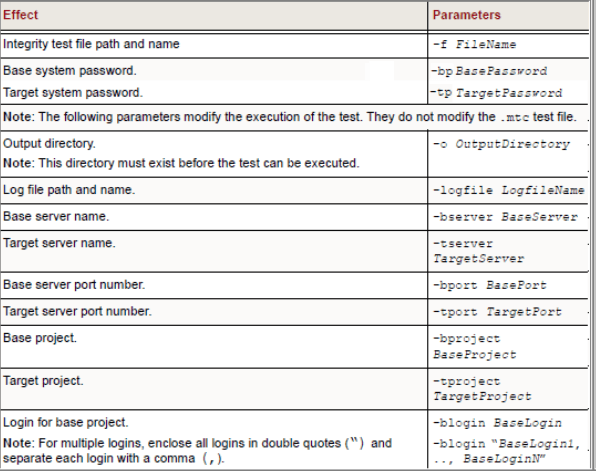
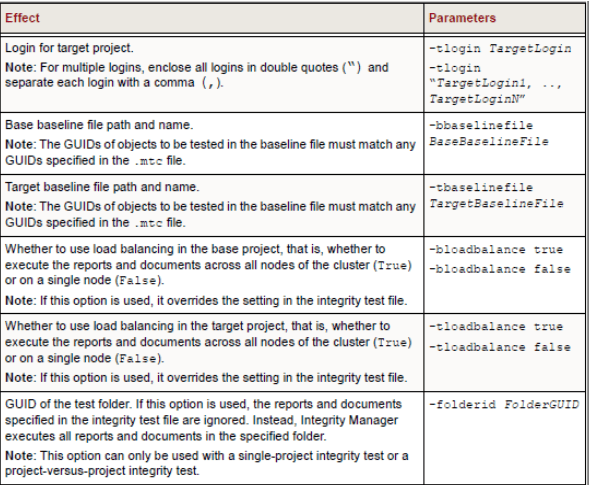
Now, to run the same saved single-project test named Demo.mtc located in C:\MSTR for which the logins/passwords for two specified users in the base project are Administrator/admin and Tester/test; use the following command:
MintMgr.exe -f C:\MSTR\Demo.mtc –blogin "Administrator, Tester" - bp "admin, test"
