EducationSoftwareStrategy.com
StrategyCommunity

Knowledge Base

Product

Community

Knowledge Base

TopicsBrowse ArticlesDeveloper Zone

Product

Download SoftwareProduct DocumentationSecurity Hub

Education

Tutorial VideosSolution GalleryEducation courses

Community

GuidelinesGrandmastersEvents
x_social-icon_white.svglinkedin_social-icon_white.svg
Strategy logoCommunity

© Strategy Inc. All Rights Reserved.

LegalTerms of UsePrivacy Policy
  1. Home
  2. Topics

KB47186: How to include an attribute as part of a user-defined condition in a case function within a metric in MicroStrategy.


Community Admin

• Strategy


This article describes how to include attributes as part of a metric's case statement in MicroStrategy.

In Strategy, users may wish to create conditions within a case function that include attributes, and then use this case function within a metric.
For example, a user may wish to create a metric that has the following logic:
When attribute1 is element1, return value1 (this value can be a metric or a constant), else return value2 (this value can be a metric or a constant.)
 
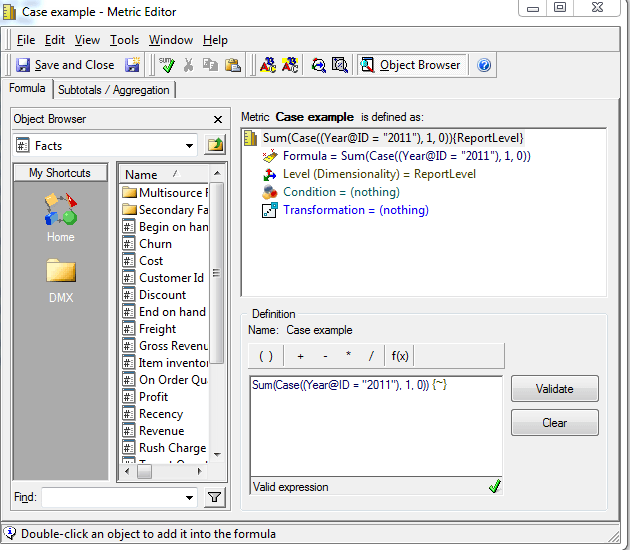
An example of a metric that contains this logic is seen below:
ka04W000000OdcSQAS_0EM440000002CLo.png


Sum(Case((Year@ID = "2011"), 1, 0)) {~} 
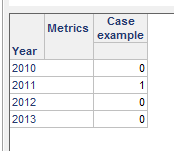
 
Notice that this metric will display a value of 1 when the year is 2011 and a value of 0 otherwise.  The values are then summed and aggregated at report level.
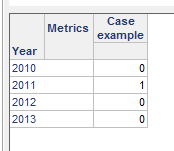
After placing "Year" and the new metric called "Case example" on a report, notice when the year is 2011 the metric displays a value of 1 and displays a value of 0 otherwise. 

ka04W000000OdcSQAS_0EM440000002CLk.png

 
To create a metric with the logic described above follow these steps:
  • Open a metric editor and create the metric with the following structure:
    AggregationFunction(case((attribute@AttributeForm="attribute element"), ReturnValue, DefaultValue)) {dimensionality}
     
    Users should be sure to specify the attribute form of the attribute that should be used in the calculation.  In the example above note that:
    AggregationFunction = sum
    attribute = Year
    AttributeForm = ID
    AttributeElement = "2011"
    ReturnValue = 1 (the return value can be a constant or a metric)
    DefaultValue = 0 (the default value can be a constant or a metric)
    dimensionality = ~ (report level)
  • Open a new report and place all objects used in the formula of the metric on the grid, as well as the metric.  The metric will now display as desired:  
ka04W000000OdcSQAS_0EM440000002CLn.png

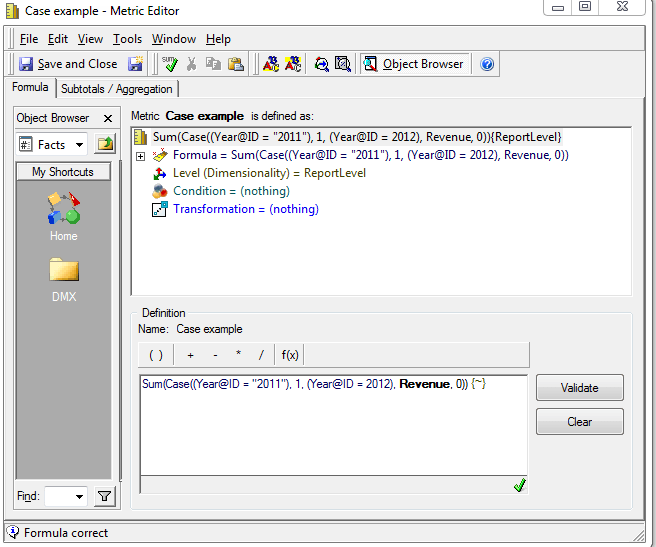
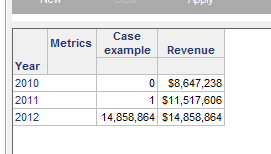
Users should note that even though the example above only uses one condition, Year@ID="2011", users are able to include as many condition as desired in the case formula.  The following is an example of a metric containing a case function with multiple conditions:
ka04W000000OdcSQAS_0EM440000002CLl.png

 
This metric will display a value of 1 for 2011, the Revenue of 2012, and 0 otherwise. 
ka04W000000OdcSQAS_0EM440000002CLm.png

 
For more information on the case function users can refer to the Strategy Functions Reference manual.


Comment

0 comments

Details

Knowledge Article

Published:

April 12, 2017

Last Updated:

April 12, 2017