EducationSoftwareStrategy.com
StrategyCommunity

Knowledge Base

Product

Community

Knowledge Base

TopicsBrowse ArticlesDeveloper Zone

Product

Download SoftwareProduct DocumentationSecurity Hub

Education

Tutorial VideosSolution GalleryEducation courses

Community

GuidelinesGrandmastersEvents
x_social-icon_white.svglinkedin_social-icon_white.svg
Strategy logoCommunity

© Strategy Inc. All Rights Reserved.

LegalTerms of UsePrivacy Policy
  1. Home
  2. Topics

KB47195: In a MicroStrategy 9.3.x - 9.4.x clustered environment, when one of the machines hosting the MicroStrategy Intelligence Servers is shutdown, the performance of other MicroStrategy Intelligence Servers in the cluster is affected


Community Admin

• Strategy


In a clustered MicroStrategy 9.3.x - 9.4.x. environment, when one of the machines hosting the MicroStrategy Intelligence Server is shutdown, the other Intelligence Servers in the cluster are very slow in responding or unresponsive.

SYMPTOM
In a clustered Strategy 9.3.x - 9.4.x. environment, when one of the machines hosting the Strategy Intelligence Server is shutdown, the other Intelligence Servers in the cluster are very slow in responding or unresponsive. This issue is more commonly observed when Strategy Intelligence Server Universal is installed on UNIX/Linux operating systems. This issue is particularly seen when the machine is shutdown without first shutting down the Strategy Intelligence Server process.
 
Errors similar to the following are seen in the DSSErrors log (if the Kernel > Warning traces are enabled):


2014-03-26 18:42:21.461+01:00 Fatal error: unable to connect to the server.
2014-03-26 18:42:21.462+01:00 ClusterManager::Validate(): Server <l93> not responding (failed): HResult = -2147206913. Try one more time.
2014-03-26 18:42:24.465+01:00 Fatal error: unable to connect to the server.
2014-03-26 18:42:24.466+01:00  ClusterManager::Validate(): Server <l93> not responding (failed): HResult = -2147206913.

 
CAUSE
This issue can be seen in environments where a response to a connect call (to connect to the Intelligence Server on the machine that was shutdown) can take a long time. This call can be slow to respond especially on UNIX/Linux operating systems. The surviving nodes try to connect to the down Intelligence Server because of the auto-join feature which is enabled by default. This feature allows Strategy Intelligence Server which shuts down unexpectedly, to automatically join the cluster when it starts up.
 
ACTION
Starting with Strategy Intelligence Server 9.3.1, a new registry setting has been added to control the auto-join feature. In cases where the auto-join is causing unresponsiveness of the surviving nodes, this feature can be disabled.
 
Beginning in Strategy 9.4.1 Hotfix 8, the registry setting is no longer required as the auto-join feature has been updated to avoid this scenario.
 
Implement the steps below to apply this registry setting.

  1. Shutdown Strategy Intelligence Server 9.3.x - 9.4.x.
  2. Make a backup of the MSIReg.reg file found in the home folder of the Strategy installation.
  3. Find the following entry in the file.  
     
    
    [HKEY_LOCAL_MACHINE\SOFTWARE\Strategy\DSS Server\Castor] 

  4. Add the following entry under this location:
     
    
     "SkipClusterChecking"=dword:00000001

     
  5. Save and close the MSIReg.reg file
  6. Repeat steps 1-5 on all the Strategy Intelligence Servers in the cluster.

 
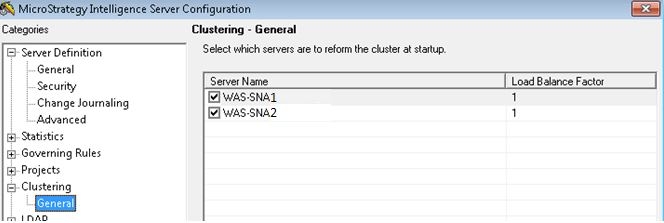
After disabling the automatic join feature by adding the above registry setting, to ensure that the cluster is automatically formed after Strategy Intelligence Server restart (shutdown can be normal shutdown or unexpected), all the servers should be selected on the server definition under Strategy Intelligence Server Configuration > Clustering as shown below. If the servers are not selected, the cluster is not automatically formed upon restart.
 

ka04W000000OhbuQAC_0EM4400000029PJ.jpeg


WORKAROUND
To avoid seeing this issue, shut down Strategy Intelligence Server before shutting down the physical machine. With this, the other nodes in the cluster will not try to communicate with the down node.
 
Registry Modification:
WARNING:
Modifying registry values incorrectly may cause serious, system-wide problems that may require the re-installation of Strategy. Any edit of the registry is done at the user's own risk. Since these are user-initiated changes, they are not covered by any Strategy warranty. Users should make a backup of the MSIReg.reg file before making any changes.  


Comment

0 comments

Details

Knowledge Article

Published:

May 9, 2017

Last Updated:

May 9, 2017