EducationSoftwareStrategy.com
StrategyCommunity

Knowledge Base

Product

Community

Knowledge Base

TopicsBrowse ArticlesDeveloper Zone

Product

Download SoftwareProduct DocumentationSecurity Hub

Education

Tutorial VideosSolution GalleryEducation courses

Community

GuidelinesGrandmastersEvents
x_social-icon_white.svglinkedin_social-icon_white.svg
Strategy logoCommunity

© Strategy Inc. All Rights Reserved.

LegalTerms of UsePrivacy Policy
  1. Home
  2. Topics

KB47196: Data in column "IS_DOC_LOC" in table "IS_DOC" is not updated after an object is moved from an old path to a new path in MicroStrategy Analytics Enterprise Manager 9.4.1.


Community Admin

• Strategy


Data in column "IS_DOC_LOC" in table "IS_DOC" is not updated after an object is moved from an old path to a new path in MicroStrategy Analytics Enterprise Manag

SYMPTOM:
 
Data in column "IS_DOC_LOC" in table "IS_DOC" is not updated after an object is moved from an old path to a new path in Strategy Analytics Enterprise Manager.
 
STEPS TO REPRODUCE:
 

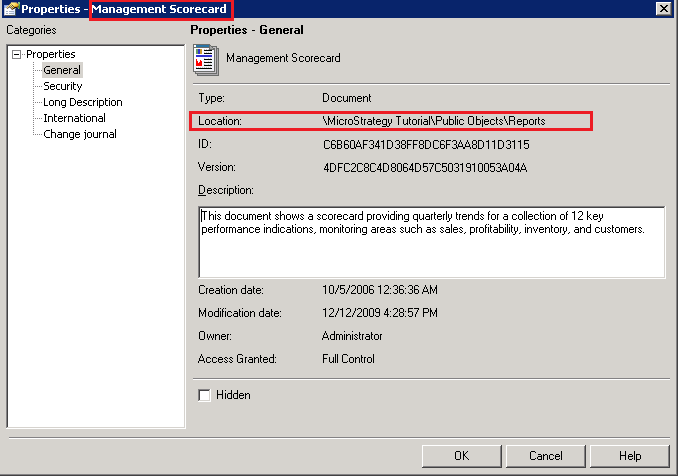
  1. The document "Management Scorecard" is located under "Strategy Tutorial\Public Objects\Reports\Dashboards and Scorecards".
ka04W000000Oh33QAC_0EM4400000029PG.png
ka04W000000Oh33QAC_0EM440000002Nuf.png


  • Move the document to a new path "Strategy Tutorial\Public Objects\Reports".
ka04W000000Oh33QAC_0EM4400000029PE.png


  • Run a manual data loading in Enterprise Manager console.


CAUSE:
 
"Location" property of objects is not updated.
 
ACTION:
 
Click "Update folder paths" under "Tools"-> "Data load options" in Enterprise Manager console.

ka04W000000Oh33QAC_0EM4400000029PC.png


  • The path of the document is not updated. The old path is still listed.

Comment

0 comments

Details

Knowledge Article

Published:

June 5, 2017

Last Updated:

June 5, 2017