EducationSoftwareStrategy.com
StrategyCommunity

Knowledge Base

Product

Community

Knowledge Base

TopicsBrowse ArticlesDeveloper Zone

Product

Download SoftwareProduct DocumentationSecurity Hub

Education

Tutorial VideosSolution GalleryEducation courses

Community

GuidelinesGrandmastersEvents
x_social-icon_white.svglinkedin_social-icon_white.svg
Strategy logoCommunity

© Strategy Inc. All Rights Reserved.

LegalTerms of UsePrivacy Policy
  1. Home
  2. Topics

KB47197: In MicroStrategy Enterprise Manager, user records in the lookup table "EM_USER" are not deleted after the users are deleted from the metadata


Community Admin

• Strategy


In MicroStrategy Enterprise Manager, user records in the lookup table "EM_USER" are not deleted after the users are deleted from the metadata. This is working as intended.

SYMPTOM
In Strategy Enterprise Manager, user records in the lookup table "EM_USER" are not deleted after the users are deleted from the metadata.
 
 
STEPS TO REPRODUCE 
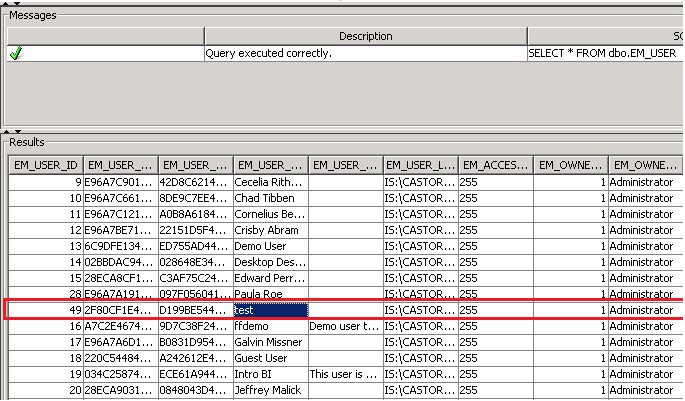
  1. In Strategy, create a new user named "test". 
  2. After a data load has occurred for the relevant Intelligence Server environment, observe that the user "test" is seen in the EM_USER table.
  3. Delete the user "test" from the Strategy 9.x metadata.
  4. Run a manual data load again from Strategy Enterprise Manager 9.x console and it is seen that the user "test" is still seen in the EM_USER table.
ka04W000000Oe26QAC_0EM4400000029PF.png

CAUSE
There is no issue here and it is working as designed. When a user object is deleted, the record corresponding to this user is not deleted from the EM_USER table (this behavior apples to all metadata objects and corresponding Lookup tables in the metadata) .
 
The column EM_EXISTS_ID in the lookup table will be updated to a value of 0 when users run the data load option to update object deletions. This allows Administrators to identify activity by users who were deleted from the metadata. The Enterprise Manager project can identify deleted configuration objects by making use of a filter based on the attribute 'Configuration Object Exists Status'
 
 
ACTION
There is no action required as this is working as designed.


Comment

0 comments

Details

Knowledge Article

Published:

April 4, 2017

Last Updated:

April 4, 2017