EducationSoftwareStrategy.com
StrategyCommunity

Knowledge Base

Product

Community

Knowledge Base

TopicsBrowse ArticlesDeveloper Zone

Product

Download SoftwareProduct DocumentationSecurity Hub

Education

Tutorial VideosSolution GalleryEducation courses

Community

GuidelinesGrandmastersEvents
x_social-icon_white.svglinkedin_social-icon_white.svg
Strategy logoCommunity

© Strategy Inc. All Rights Reserved.

LegalTerms of UsePrivacy Policy
  1. Home
  2. Topics

KB47212: Unable to unselect element after a row selected in Microchart widget set as selector with MicroStrategy Web 9.4.1


Community Admin

• Strategy


Unable to unselect element after a row selected in Microchart widget set as selector with MicroStrategy Web 9.4.1

SUMMARY:
 
This issue is classified as a defect. The impact is limited to dashboards defined with Microchart widget which grid is set as a selector. One workaround is suggested.
 
SYMPTOM:
 
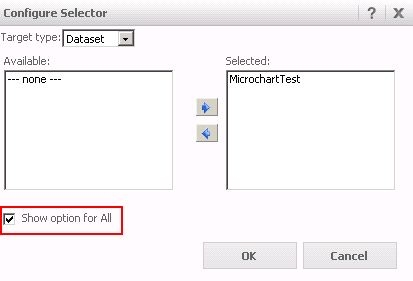
Even with "Show option for all" is checked, the option to unselect selector element is unavailable in Microchart widget where the grid is set as a selector.
 

ka04W000000OgfBQAS_0EM44000000265e.jpeg

 
STEPS TO REPRODUCE:

  • Create a grid report with 3 attributes and 5 metrics.
  • Create a document with the grid as a dataset.
  • Add two grid and select Microchart widget for the grist on the left.
  • Set the attribute in the Microchart widget as the selector for the grid next to it as the target.
  • Enable "Show option for all" checkbox.
  • Execute the document and select a row in the grid.
ka04W000000OgfBQAS_0EM44000000265R.jpeg
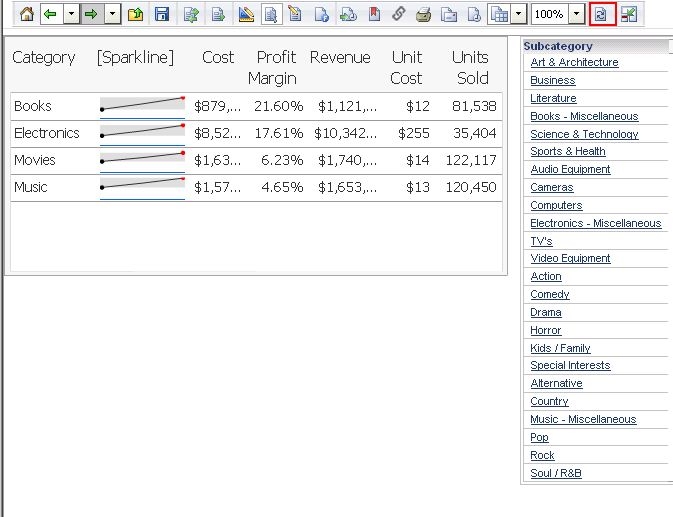
  • Notice that there is no option to select all or unselect the value.

 
CAUSE:
 
This is a known issue with Strategy Web 9.4.1. "Select all" was possible by clicking the column header with Strategy 9.2.x.
 
ACTION:
 
Contact Strategy Technical Support for an updated status of this issue.
 
WORKAROUND:
 
Use refresh button to bring all the element back in the target.
 

ka04W000000OgfBQAS_0EM44000000265c.jpeg


TO LEARN MORE:

  • TN42878: New Microchart Tree Mode Widget in Strategy Mobile 9.3.1
  • TN45913: Microchart selector in tree mode collapses when running a Report Services document in Interactive mode in Strategy Web 9.4.1
  • TN42975: Using a Microchart widget with Strategy Web 9.3.0, values disappear when an attribute element containing a period (full stop) character is used as a selector
  • Product Manual: Strategy Dashboards and Widgets Creation Guide (PDF) > 5. PROVIDING FLASH ANALYSIS AND INTERACTIVITY: WIDGETS > Creating widgets >  Creating a Microcharts widget (page 290 or PDF page 326/534).


Comment

0 comments

Details

Knowledge Article

Published:

June 13, 2017

Last Updated:

June 13, 2017