EducationSoftwareStrategy.com
StrategyCommunity

Knowledge Base

Product

Community

Knowledge Base

TopicsBrowse ArticlesDeveloper Zone

Product

Download SoftwareProduct DocumentationSecurity Hub

Education

Tutorial VideosSolution GalleryEducation courses

Community

GuidelinesGrandmastersEvents
x_social-icon_white.svglinkedin_social-icon_white.svg
Strategy logoCommunity

© Strategy Inc. All Rights Reserved.

LegalTerms of UsePrivacy Policy
  1. Home
  2. Topics

KB47213: Users need to click twice to close the info window where the Transaction Services form is displayed in MicroStrategy Web 9.4.1


Community Admin

• Strategy


Unlike in MicroStrategy Web 9.2.x where users need to click outside of the Info Window only once to close it, In MicroStrategy Web 9.4.x users must now click twice to cancel a change in a Transaction Services form

SUMMARY:
This issue is classified as a product design change. The issue does not impact any functionality of Strategy Web, but just slightly alters the user experience.
 
SYMPTOM:
Unlike in Strategy Web 9.2.x where users need to click outside of the Info Window only once to close it,  In Strategy Web 9.4.x users must now click twice to cancel a change in a Transaction Services form. 
 
STEPS TO REPRODUCE:
  • Create a document with Transaction Services where a form is rendered inside an Info Window.
  • Type a given number in one or more fields.
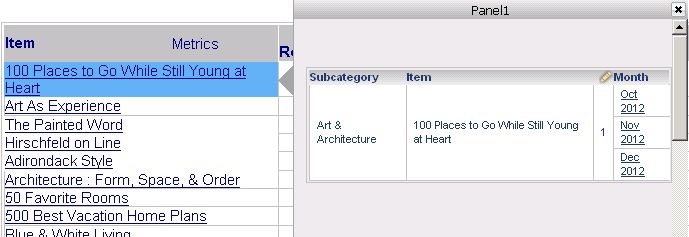
  • Click outside of the Info Window to try closing it without submitting an update:
     
ka04W000000Oaa2QAC_0EM44000000265j.jpeg
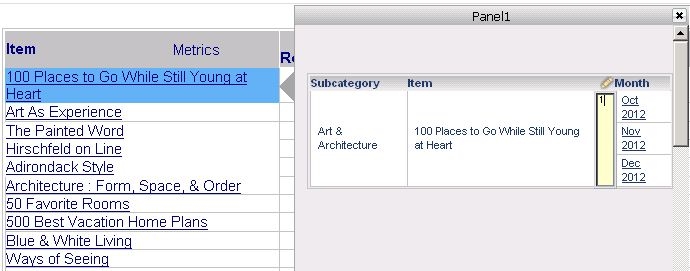
  • Notice that the Info Window does not get closed on the first click, but closesafter the second click:
ka04W000000Oaa2QAC_0EM44000000265h.jpeg

CAUSE:
This is a known issue with Strategy Web 9.4.1.
 
ACTION:
Contact Strategy Technical Support for an updated status of this issue. The Strategy Internal Reference Number for the issue discussed in this technical note is 901884.
 
TO LEARN MORE:

  • KB44592: After hitting Submit on an transaction inside an Information window, even when pressing the close button it will not close in Strategy Web 9.3.1  
  • KB42611: New feature in Strategy Web 9.3.0: Stand-alone selector triggers information window when running a Report Services document in Flash/Express mode
  • Strategy Advanced Reporting Guide product manual > 11. CUSTOM SQL QUERIES: FREEFORM SQL AND QUERY BUILDER > Updating data with Transaction Services


KB47213


Comment

0 comments

Details

Knowledge Article

Published:

June 11, 2017

Last Updated:

December 31, 2018