SUMMARY:
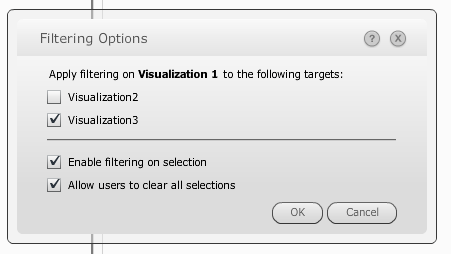
In Strategy Web 9.4.x and 9.5.x, users can visualize data by using dashboards created in Visual Insight. On these dashboards, attributes on certain visualizations, such as the Grid visualization, can be used as filters to target other visualizations. For example, a dashboard may have a grid that contains elements of Year and a second Grid visualization that shows profits by Category. Users can configure the Year element on the grid visualization to act as a filter to filter the results show in the second grid. This feature is accessed through the visualization drop-down menu in the upper-right of the titlebar. The option window looks like this:
SYMPTOM:
In some cases, users may design multiple visualizations to act as filters targeting a single visualization. Continuing the example from above, consider a scenario where in addition to the grid filtering for Year, there is also a grid filtering for Region, and both grids target the grid showing profits by category. An end user may first select a Year, e.g. 2012, and then a Region, e.g. Northeast, and expect the target grid to show profits gained only in the year 2012 and in the Northeast region. Instead however, the target grid shows only profits for the Northeast region but returns data for all years, like shown below:
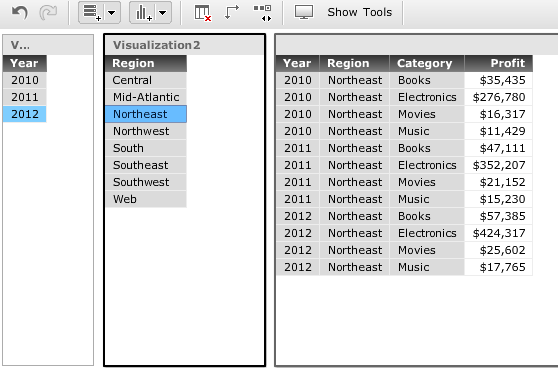
First clicking on 2012 then clicking on Northeast causes the target grid (right) to display data for the Northeast region but across all years.
CAUSE:
This behavior is expected. In Strategy 9.4.x and 9.5.x, targeted visualizations, even if they are targeted by multiple visualizations, will only filter based on the last selected criteria. In other words, template-level filtering criteria do not intersect. In this way, end users can update target visualizations quickly without having to clear previous selections. Continuing the example from above, consider the case where an end user wanted to show all data for the Northeast region in the target grid. If template-level filtering criteria were to intersect, the user would have to manually clear the Year criteria and any other criteria that she had previously selected on her other visualizations. Because of the design in Strategy 9.4.x and 9.5.x, she does not have to do that. Instead, the targeted grid will reflect the criteria from only her last made selection, speeding up her workflow.
ACTION:
To apply multiple filtering criteria to visualizations, consider using the Filters pane instead of using multiple visualizations as filters, or use a combination of a Page-by and visualization as filter.
