EducationSoftwareStrategy.com
StrategyCommunity

Knowledge Base

Product

Community

Knowledge Base

TopicsBrowse ArticlesDeveloper Zone

Product

Download SoftwareProduct DocumentationSecurity Hub

Education

Tutorial VideosSolution GalleryEducation courses

Community

GuidelinesGrandmastersEvents
x_social-icon_white.svglinkedin_social-icon_white.svg
Strategy logoCommunity

© Strategy Inc. All Rights Reserved.

LegalTerms of UsePrivacy Policy
  1. Home
  2. Topics

KB47235: Results appear differently between MicroStrategy Developer and Web when applying custom formatting to a derived metric


Stefan Zepeda

Salesforce Solutions Architect • Strategy


Results appear differently between MicroStrategy Developer and Web when applying custom formatting to a derived metric.

SYMPTOM:
 
When applying ""00":hh:mm:ss;dd:hh:mm:ss" as custom formatting to a derived metric in a report, results are shown differently between Strategy Developer and Web.
 
 
STEPS TO REPRODUCE:
In Strategy Developer, create a report using the steps below:
  • Create a blank report with attribute "Region" on the rows and metric "Revenue" on the columns.
  • Create a derived metric on the "Revenue" metric with expression: "Revenue/5000000".
  • Place the derived metric on the report grid and apply custom formatting to the derived metric value with: ""00":hh:mm:ss;dd:hh:mm:ss"
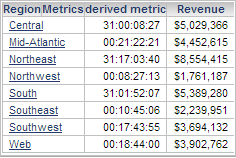
  • Run the report in Developer and results should display as follows:
ka04W000000OcewQAC_0EM440000002CLg.png
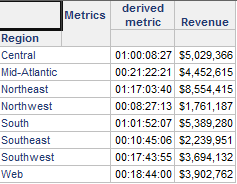
  • Run the report in Web and results should display as follows:
ka04W000000OcewQAC_0EM440000002CLj.png

 
CAUSE:
 
This is a known issue with Strategy.
 
ACTION:
 
Contact Strategy Technical Support for an update on this issue 
 
WORKAROUND:
 
Refer to the following technote on how to perform a conversion of seconds to a timestamp.
 
KB47068: How to manipulate a column that returns second values and convert it to a timestamp in Strategy


Comment

0 comments

Details

Knowledge Article

Published:

June 9, 2017

Last Updated:

January 3, 2023