SYMPTOM:
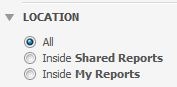
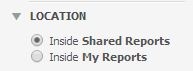
The Search page in Web by default allows users to perform the search in only the Shared Reports folder or the My Reports folder or All folders. An administrator may find it necessary to limit these options to exclude the “All” option and thus, default the selection to “Shared Reports” instead.
Before Customization:
After Customization:
ACTION:
Follow these steps to achieve this customization:
1. Create a new plugin in the Web Customization Editor (WCE)
2. Go to the web directory > jsp and make a copy of Advance_Search.jsp and SearchSuggest_Content.jsp. Name them Advance_Search2.jsp and SearchSuggest_Content2.jsp for example.
3. Open these two copies and make the following changes:
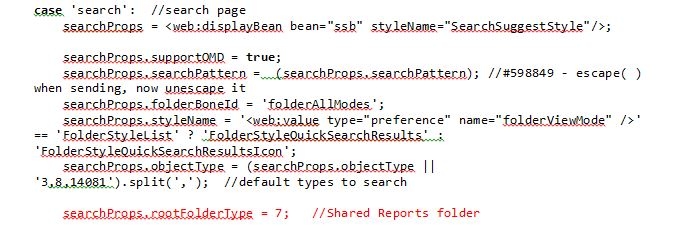
For Advance_Search2.jsp, locate and remove the following lines:
<input id="rootFolderType_39" name="rootFolderType" value="39" type="radio"><label for="rootFolderType_39"><web:descriptor key="mstrWeb.2058" desc="All" /></label>

                <br/>
4. Go to web directory > plugins > _Interface > jsp and copy the Menu_DockLeft.jsp to the corresponding folder in your custom plugin.
5. Go back to the WCE > Pages > search(Search Page) > Template Properties tab.
6. Change your dock left section to the copied Menu_DockLeft.jsp file. Then edit this file to replace:
<jsp:include page='/jsp/Advanced_Search.jsp' flush="true" />
<jsp:include page='/jsp/Advanced_Search2.jsp' flush="true" />
<jsp:include page='/jsp/SearchSuggest_Content.jsp' flush="true" />
<jsp:include page='/jsp/SearchSuggest_Content2.jsp' flush="true" />
