EducationSoftwareStrategy.com
StrategyCommunity

Knowledge Base

Product

Community

Knowledge Base

TopicsBrowse ArticlesDeveloper Zone

Product

Download SoftwareProduct DocumentationSecurity Hub

Education

Tutorial VideosSolution GalleryEducation courses

Community

GuidelinesGrandmastersEvents
x_social-icon_white.svglinkedin_social-icon_white.svg
Strategy logoCommunity

© Strategy Inc. All Rights Reserved.

LegalTerms of UsePrivacy Policy
  1. Home
  2. Topics

KB47254: How to create a subscription to refresh Intelligent Cubes using MicroStrategy Command Manager 9.4.1


Community Admin

• Strategy


KB47254: How to create a subscription to refresh Intelligent Cubes using MicroStrategy Command Manager 9.4.1

Currently it is not possible to create a cube refresh subscription in Command Manager. However, users can achieve this functionality by creating a cache update subscription to refresh Intelligent Cubes. Both types of subscriptions when targeting intelligent cubes will submit the same SQL statements to the database.
 
The following on how to achieve this is done in Strategy Tutorial 9.4.1:
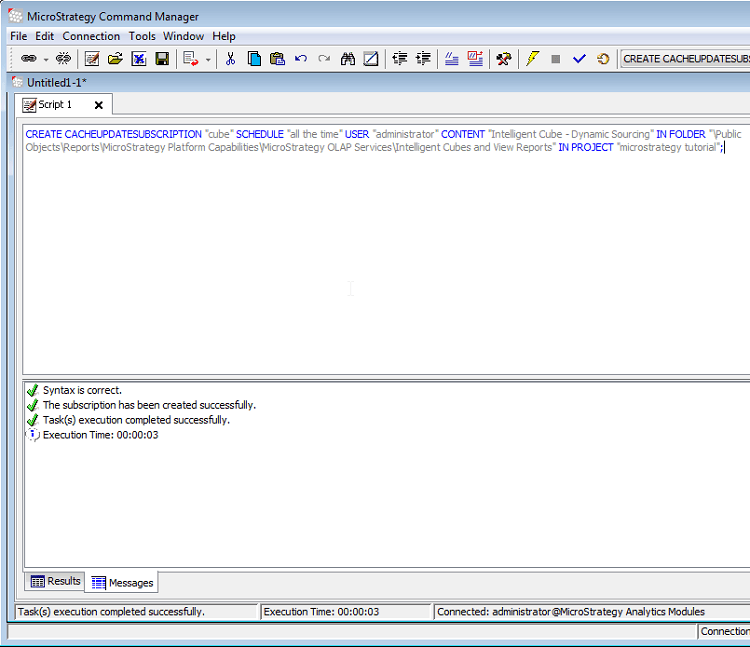
 

  • In Command Manager, create a cache update subscription by running the script below:
ka04W000000OhKyQAK_0EM440000002CLd.png
  •  

    
    CREATE CACHEUPDATESUBSCRIPTION "cube cache update" SCHEDULE "all the time" USER "administrator" CONTENT "Intelligent Cube - Dynamic Sourcing" IN FOLDER "\Public Objects\Reports\Strategy Platform Capabilities\Strategy OLAP Services\Intelligent Cubes and View Reports" IN PROJECT "Strategy tutorial";
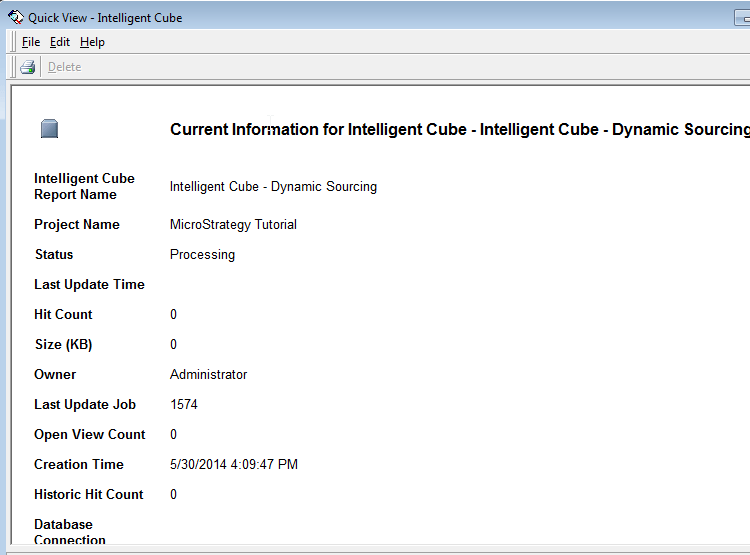

     
  • In Command Manager, trigger subscription "cube refresh subscription"
  • Check the cube information and verify with timestamp that the cube was successfully refreshed.
ka04W000000OhKyQAK_0EM440000002CLh.png


Comment

0 comments

Details

Knowledge Article

Published:

May 24, 2017

Last Updated:

May 24, 2017