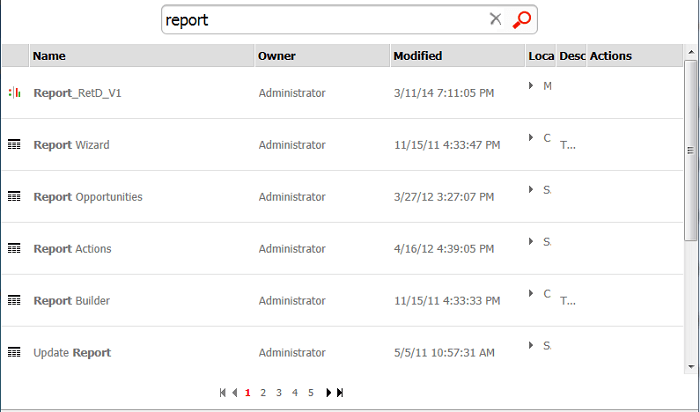
URL API can be used to create a link that performs an object search in a given project and return the search results in the Strategy Web interface. The following example URL shows URL API capabilities. In this case, a search for the keyword "report" and 2 object types was performed via URL API in Strategy Web 9.4.1 running on IIS:
http:///MicroStrategy/asp/Main.aspx?evt=3040&src=Main.aspx.3040&srchStr=report&server=&Project=Strategy+Tutorial&objectType=14081%2C3

The syntax is broken down as follows:
Base URL
For ASP: http:///MicroStrategy/asp/Main.aspx?
For JSP: http:///MicroStrategy/servlet/mstrWeb?
Event
The event used to perform a search through URL API is "3040". This event must be populated in the evt and src parameter:
For ASP: evt=3040&src=Main.aspx.3040
For JSP: evt=3040&src=mstrWeb.3040
Search keyword
The search keyword is passed to Intelligence Server in the srchStr parameter. In this example the search keyword is "report":
&srchStr=report
Object type
The objectType parameter indicates which object types are returned by the search. Multiple object types can be separated by an encoded comma character "%2C". Find below a list of object types and the corresponding object ID. In this example, only documents and reports are returned, set by object ID 14081 (document) and 3 (report):
&objectType=14081%2C3
For other object types use one or more of the following object IDs:
Attribute: 12
Custom Group: 257
Document: 14081
Filter: 256
Folder: 8
HTML Document: 14080
Metric: 4
Prompt: 10
Report: 3
Shortcut: 18
Template: 2
Server and project
Set the Intelligence Server and project name in the server and project arguments:
&server=&Project=Strategy+Tutorial
Hidden Sections
If required, the search results page can be rendered without navigation and sidebars by adding the following parameter:
&hiddensections=path,dockTop,dockLeft,footer
The result would look similar to this: