EducationSoftwareStrategy.com
StrategyCommunity

Knowledge Base

Product

Community

Knowledge Base

TopicsBrowse ArticlesDeveloper Zone

Product

Download SoftwareProduct DocumentationSecurity Hub

Education

Tutorial VideosSolution GalleryEducation courses

Community

GuidelinesGrandmastersEvents
x_social-icon_white.svglinkedin_social-icon_white.svg
Strategy logoCommunity

© Strategy Inc. All Rights Reserved.

LegalTerms of UsePrivacy Policy
  1. Home
  2. Topics

KB47280: "Object variable or with block variable not set" error message appears when doing Project Documentation within MicroStrategy Developer 9.4.x and above


Stefan Zepeda

Salesforce Solutions Architect • Strategy


This knowledge base article documents why "Object variable or with block variable not set" error message appears when doing Project Documentation within MicroStrategy Developer 9.4.x and above.

SYMPTOM:

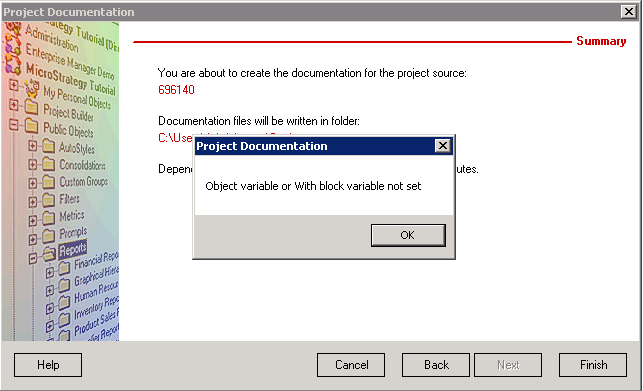
A user performing Project Documentation within Strategy Developer 9.4.x and above receives the error message below:
 

ka04W000001IuKaQAK_0EM440000002CLE.png


Object variable or With block variable not set

NOTE: This is seen when configuration objects are being profiled.
 

CAUSE:

This is a known issue in Strategy Developer 9.4.x and above with regards to Project Documentation.  The issue centers around Strategy user objects which have been linked to a Windows user account for metadata authentication purposes.  If the Windows user which is linked cannot be retrieved as seen below, Project Documentation will not be able to successfully output the users definition and will report the above error.

ka04W000001IuKaQAK_0EM440000002CLX.png


The Windows User ID is valid but the name couldn't be retrieved


ACTION:

The issue will not be fixed as there is workaround for this issue and Developer is in maintenance mode.
 

WORKAROUND:

There are two possible workarounds which will allow Project Documentation to complete successfully. 
1) Within Project Documentation, uncheck the Authentication option within the users definition.  With Project Documentation not trying to output this information it will not fail with the error.

ka04W000001IuKaQAK_0EM440000002CLV.png

2) Clearing the unretrievable Windows user which is linked will allow Project Documentation to complete successfully as well.  This will need to be done within every user which has the above issue in the User Editor -> Authentication -> Metadata -> Windows Authentication field.
To help identify the affected users, the following Strategy Command Manager 9.4.x and above script can be used:


LIST ALL PROPERTIES FOR USERS IN GROUP "Everyone";

This output can then be exported to Microsoft Excel where you can filter the NTLink column for the text "Cannot lookup NTLink for this user".  Any user which has this output for the NTLink field is affected by not being able to retrieve the requested Windows user.


Comment

0 comments

Details

Knowledge Article

Published:

June 6, 2017

Last Updated:

June 6, 2017