Requirement: In order to enable the Push Notification Feature in Strategy Analytics Enterprise 9.4.1, make sure the system requirements are in compliance with the Strategy technical note:
CONFIGURATION:
1. Add the PEM file to a folder in the Strategy Intelligence Server installation.
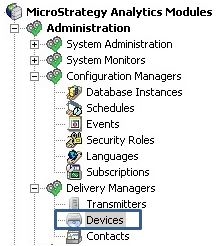
2. Go to Administration >> Delivery Managers >> Devices:
3. Create a new Device based on an iPhone or iPad transmitter that is shipped by default, i.e.:
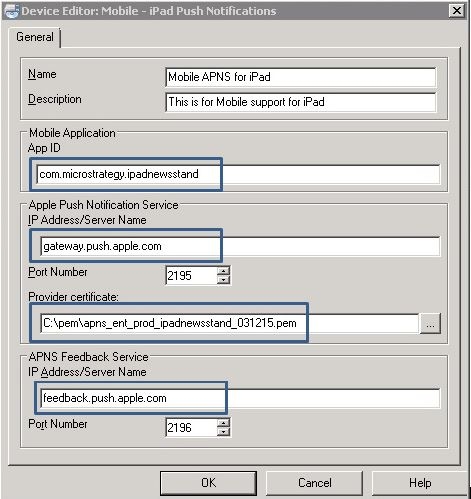
General
- Name: Identification of the new device in the list of available devices
- Description: This is a description of what this device is intended for.
Mobile Application
- App ID: This should match the App ID used when compiling the Strategy Mobile App.
Apple Push Notification Service
- IP Address/Server Name: gateway.push.apple.com
- Port number: 2195
Provider certificate:
- This is the location of the PEM file placed in the Strategy Intelligence Server folder structure.
APNS Feedback Service
- IP Address/Server Name: feedback.push.apple.com
- Port number: 2196
4. Create a new Schedule Administration Tasks for Deliver Newsstand Push Notification:

5. In the Strategy Intelligence Server Configuration >> Governing Rules >> Default >> General define the Mobile Newsstand session idle time in seconds, as shown:

NOTE:
For additional information on how to enable the Push Notification feature in Strategy Analytics Enterprise 9.4.1, refer to the following Strategy technical notes:
Third Party Software Installation Warning:
The third-party product(s) discussed in this technical note is manufactured by vendors independent of Strategy. Strategy makes no warranty, express, implied or otherwise, regarding this product, including its performance or reliability.
kb48044
