EducationSoftwareStrategy.com
StrategyCommunity

Knowledge Base

Product

Community

Knowledge Base

TopicsBrowse ArticlesDeveloper Zone

Product

Download SoftwareProduct DocumentationSecurity Hub

Education

Tutorial VideosSolution GalleryEducation courses

Community

GuidelinesGrandmastersEvents
x_social-icon_white.svglinkedin_social-icon_white.svg
Strategy logoCommunity

© Strategy Inc. All Rights Reserved.

LegalTerms of UsePrivacy Policy
  1. Home
  2. Topics

KB47311: In MicroStrategy Web 9.4.1, After Applying the SDK Customization "Modifying the Look and Feel of the List View for Folder Contents on Folder Browsing Pages" a JavaScript Client Side Error Is Thrown in Internet Explorer 8 and 9


Community Admin

• Strategy


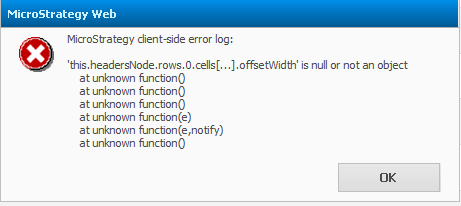
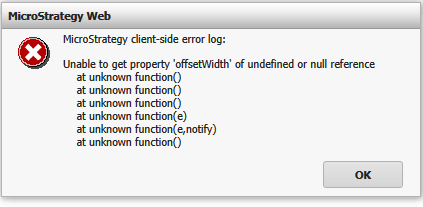
After applying the SDK Web customization called "Modifying the Look and Feel of the List View for Folder Contents on Folder Browsing Pages" it is noticed that a JavaScript error is thrown.

SYMPTOM:
After applying the SDK Web customization called "Modifying the Look and Feel of the List View for Folder Contents on Folder Browsing Pages" it is noticed that a JavaScript error is thrown.
In Internet Explorer 8 the following error is thrown:
ka04W000000OcV3QAK_0EM440000002GVa.png

 
In Internet Explorer 9 the following error is thrown:
ka04W000000OcV3QAK_0EM440000002GVX.png

 
STEPS TO REPRODUCE:
Apply the Plugin or use the Strategy SDK Web Customization Editor as outlined in  the Strategy MSDL 
Home > Web SDK > Customizing Strategy Web > Part I: Fundamentals of Customization > Scenarios: Cosmetic Changes for Look and Feel > Modifying the Look and Feel of the List View for Folder Contents on Folder Browsing Pages.
 
See link below:
Deploying the plug-in provided with MicroStrategy SDK
 
CAUSE:
 This is a known issue in Strategy Analytics Enterprise 9.4.1.
 
ACTION:
Contact Strategy Technical Support for an update on this issue.


Comment

0 comments

Details

Knowledge Article

Published:

March 31, 2017

Last Updated:

July 17, 2017