EducationSoftwareStrategy.com
StrategyCommunity

Knowledge Base

Product

Community

Knowledge Base

TopicsBrowse ArticlesDeveloper Zone

Product

Download SoftwareProduct DocumentationSecurity Hub

Education

Tutorial VideosSolution GalleryEducation courses

Community

GuidelinesGrandmastersEvents
x_social-icon_white.svglinkedin_social-icon_white.svg
Strategy logoCommunity

© Strategy Inc. All Rights Reserved.

LegalTerms of UsePrivacy Policy
  1. Home
  2. Topics

KB47328: How to improve the performance of the Drill Map Editor when is too slow in MicroStrategy Developer 9.x?


Stefan Zepeda

Salesforce Solutions Architect • Strategy


How to improve the performance of the Drill Map Editor when is too slow in MicroStrategy Developer 9.x

 
SYMPTOM:
 
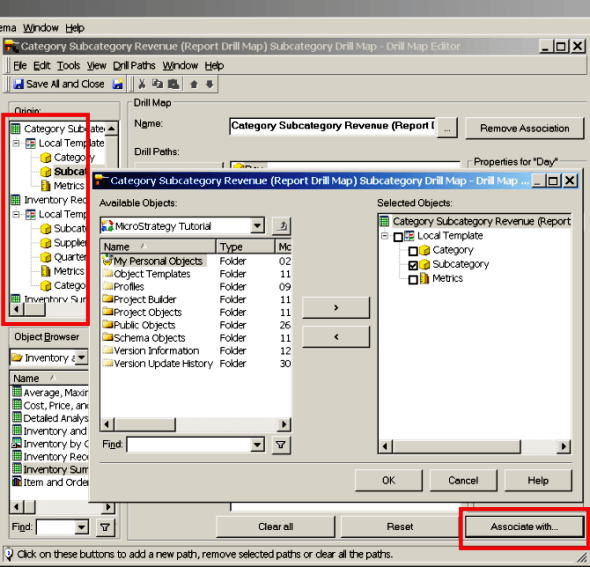
While attempting to modify a Drill Map that has several hundreds of dependent reports the performance of the Drill Map Editor can degrade to the extent that opening the Editor and/or the "Associated with..." window can take up to several minutes.
 
Also saving the changes applied and closing the Editor can be slow, thus contributing to an overall poor performance.


ka02R000000kWN1QAM_0EM440000002CJP.png


CAUSE:
 
The performance of the Drill Map Editor can be negatively affected by several factors, amongst which:
  
1. Whilst editing the Drill Map the maximum object cache consumption could reach a value in MB that is higher than the one specified
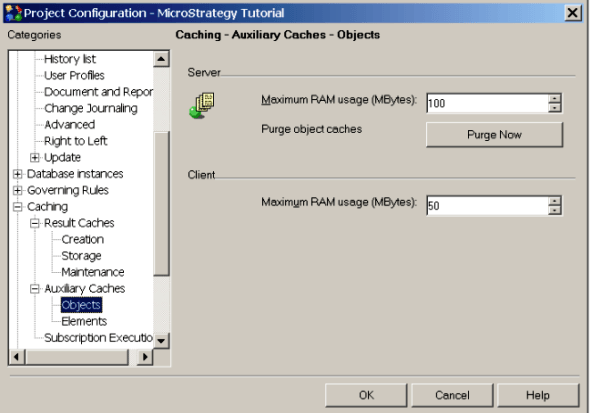
      in the object cache setting under Project Configuration > Caching  and this could lead to cache swap out-in memory.
 
2. In a  2-Tier project attribute objects are not cached or reused .
  
 
ACTION:
   
1. Enlarge the object cache setting under Project Configuration > Caching as shown below:


ka02R000000kWN1QAM_0EM440000002CJV.png


2. Use the Drill Map Editor in a 3-Tier project to improve performance.


Comment

0 comments

Details

Knowledge Article

Published:

June 8, 2017

Last Updated:

July 17, 2017