SUMMARY
This issue has been classified as an enhancement in Strategy 9.4.x. The impact is limited to Strategy 9.4.x - 10.2 when using a level metric which uses an attribute and a security filter. There is a workaround available in the current document. The product design has been modified in Strategy Secure Enterprise 10.3 and this issue will not be seen in that version.
SYMPTOM
When a user with a security filter runs an intelligent cube report with a level metric that uses an attribute in its definition, the metric values will not display.
STEPS TO REPRODUCE
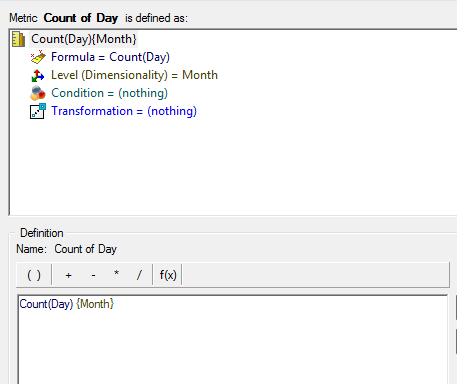
1. Create a metric defined as Count(Day) at the level of Month.
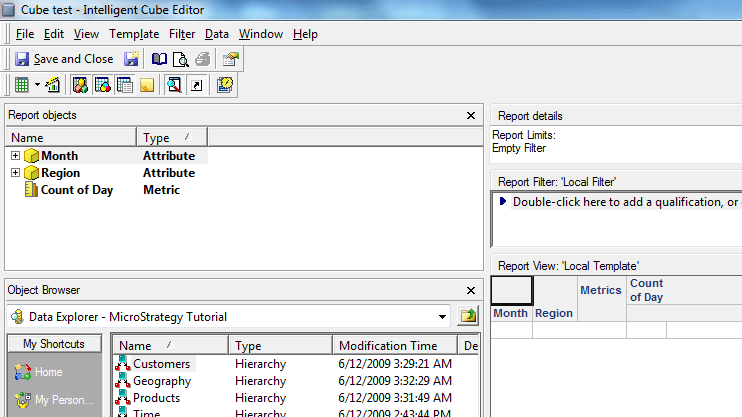
2. Create an intelligent cube with the month attribute, the region attribute, and the count of day metric from the first step.
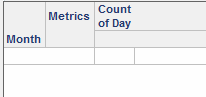
3. Create a report on this intelligent cube with the month attribute and the count of day metric.
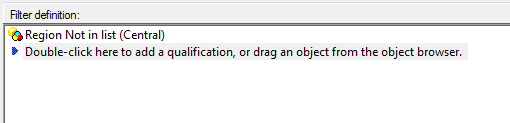
4. Create a security filter on the region attribute such as region not in list central.
5. Apply the security filter to a user group
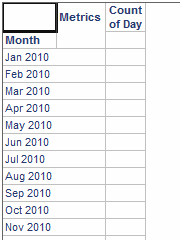
6. Log in as the user in the group with the security filter. When the user runs the view report, the metric data will not display.
CAUSE
This issue is occurring because the user has a security filter. This is the designed behavior in Strategy 9.4.x - 10.2. After the application of the security filter, even though the metric level attribute (Month) is not related to the Security Filter attribute (Region), the data security step does not go through as the engine evaluates the metric level to be higher than the security filter attribute level.
ACTION
This issue will not be seen in Strategy Secure Enterprise 10.3. The data security step is evaluated differently after the application of the security filter. If the engine evaluates that the metric level is unrelated to the security filter attribute, the metric data is displayed to the user.
WORKAROUND:
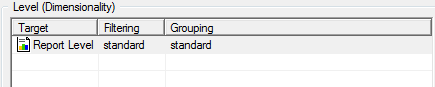
A user may workaround this issue by changing the metric level to be report level and setting the dynamic aggregation function to maximum.

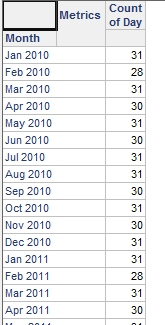
The Metric values will display for a user with a security filter.
ADDITIONAL TROUBLESHOOTING:
If the workaround steps above do not resolve the issue, consider calling Strategy Technical Support with the following information:
--How is the metric defined?
--How is the security filter defined?
--Does this issue only occur for Intelligent cube reports or does it occur for standard reports as well?
--Does this issue only occur for users with security filters or does it occur for all users?
TO LEARN MORE:
Related Tech Notes:
Tech Note 30696: Overview of security filter application to view reports based on Intelligent Cubes in Strategy OLAP Services 9.x
Tech Note 30711: Security filter application to view reports based on Intelligent Cubes missing the security filter attribute in Strategy OLAP Services 9.x
