EducationSoftwareStrategy.com
StrategyCommunity

Knowledge Base

Product

Community

Knowledge Base

TopicsBrowse ArticlesDeveloper Zone

Product

Download SoftwareProduct DocumentationSecurity Hub

Education

Tutorial VideosSolution GalleryEducation courses

Community

GuidelinesGrandmastersEvents
x_social-icon_white.svglinkedin_social-icon_white.svg
Strategy logoCommunity

© Strategy Inc. All Rights Reserved.

LegalTerms of UsePrivacy Policy
  1. Home
  2. Topics

KB47336: "The lookup table `table name´ was not found either within the expression`s related tables or within the EXPSOURCETABLES explicitly defined" error appears when creating an attribute in MicroStrategy Command Manager


Community Admin

• Strategy


"The lookup table `table name´ was not found either within the expression`s related tables or within the EXPSOURCETABLES explicitly defined" error appears when creating an attribute in MicroStrategy Command Manager 9.x

SYMPTOM:
 
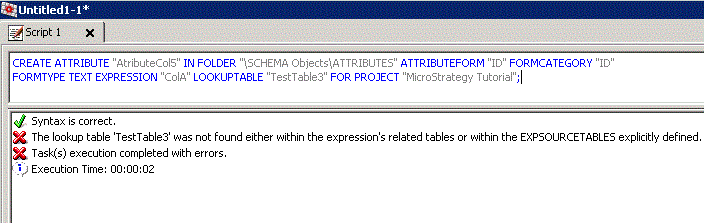
"The lookup table 'table name' was not found either within the expression's related tables or within the EXPSOURCETABLES explicitly defined" error appears when running script to create an attribute in Strategy Command Manager 9.x as shown below:
 

ka04W000000OecnQAC_0EM440000002CHA.gif


CREATE ATTRIBUTE "AtributeCol5" IN FOLDER "\SCHEMA Objects\ATTRIBUTES" ATTRIBUTEFORM "ID" FORMCATEGORY "ID" FORMTYPE TEXT EXPRESSION "ColA" LOOKUPTABLE "TestTable3" FOR PROJECT "Strategy Tutorial";


Syntax is correct.
The lookup table 'TestTable3' was not found either within the expression's related tables or within the EXPSOURCETABLES explicitly defined.
Task(s) execution completed with errors.
Execution Time: 00:00:02
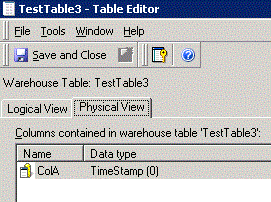
 
While source table TestTable3 includes column ColA in table editor in Desktop as shown below:
 

ka04W000000OecnQAC_0EM440000002CH6.gif

 
CAUSE:
 
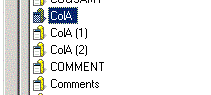
One possible cause for this issue is that ColA is not mapping to TestTable3 due to duplicate column issue as described in KB35168. Multiple columns with extra suffix are seen in System Objects\Columns folder after enabling Desktop to show it by following KB19828 as shown below:
 

ka04W000000OecnQAC_0EM440000002CH7.gif

 
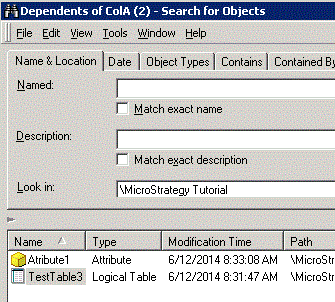
The dependent search of ColA (2) indicates that TestTable3 actually includes column ColA (2) instead of ColA as shown below:
 

ka04W000000OecnQAC_0EM440000002CH4.gif


ACTION:
 
Please contact Strategy Technical Support to merge duplicate column objects.


Comment

0 comments

Details

Knowledge Article

Published:

June 8, 2017

Last Updated:

June 8, 2017