EducationSoftwareStrategy.com
StrategyCommunity

Knowledge Base

Product

Community

Knowledge Base

TopicsBrowse ArticlesDeveloper Zone

Product

Download SoftwareProduct DocumentationSecurity Hub

Education

Tutorial VideosSolution GalleryEducation courses

Community

GuidelinesGrandmastersEvents
x_social-icon_white.svglinkedin_social-icon_white.svg
Strategy logoCommunity

© Strategy Inc. All Rights Reserved.

LegalTerms of UsePrivacy Policy
  1. Home
  2. Topics

KB47344: "The metric definition has an error" message appears when creating a metric using the Metric Editor in MicroStrategy Web 9.4.1 and newer.


Community Admin

• Strategy


"The metric definition has an error" message appears when creating a metric using the Metric Editor in MicroStrategy Web 9.4.1 and newer.

SYMPTOM:
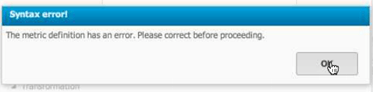
In Strategy Web 9.4.1, users can create stand-alone metrics based off of existing basic functions. If there is a pre-existing metric that has the same name as the basic function being used in the new metric, users will encounter the error below:
ka04W000000Of0QQAS_0EM44000000266l.png


The metric definition has an error. Please correct before proceeding.

 
STEPS TO REPRODUCE:

  1. In Strategy Web 9.4.1, create a metric by using the "Sum" basic function. Notice it works successfully.
  2. In Strategy Developer, create a Object Template of type Metric Template named "Sum" with the formula "Sum(1){~}".
  3. In Strategy Web, try creating a metric by using the "Sum" basic function. Notice the error message.

 
CAUSE:
This is a known issue in Strategy Web 9.4.1.
 
ACTION:
Currently this issue is still being reviewed for feasibility by our Technology team and is not scoped for any upcoming scheduled Strategy release.
 
WORKAROUND:
Because this issue only occurs when there is a metric with the same name as a basic function, users should change the name of the existing metric.


Comment

0 comments

Details

Knowledge Article

Published:

June 16, 2017

Last Updated:

June 16, 2017