SUMMARY
This issue has been classified as a defect by Strategy. The impact is limited to the "Top 10 Longest Executing Reports" report in Strategy Enterprise Manager 9.x. A workaround is available in the current document. A solution/code fix for this issue is available in Strategy 10.0 GA.
SYMPTOM
When a user runs the "Top 10 Longest Executing Reports" report in Strategy Enterprise Manager 9.x., the report gives the error below.

Error: Error(s) occured while loading report: DSSSQLEngine: Schema loading error: There is an error in the report definition. The element shown in the following hierarchy has invalid definition or no longer exists: Report (6. Top 10 Longest Executing Report) - There is error in report defintion. The element shown in the following hierarchy has invalid or no longer exists: Report () - Filter (Local Filter). Filter Unit-Filter Unit-Function 'NOT' has more than one parameter. Error in Process method of Component: SQLEngineServer, Project Enterprise Manager, Job 262, Error Code= -2147212797.

2. Run report 6. Top 10 Longest Executing reports and choose the default prompt answers

3. The report will give the error below

CAUSE
This is a known issue classified as a defect with Strategy Enterprise Manager 9.x.
ACTION
This issue has been fixed in Strategy 10.0 GA. Upgrade to this version to take advantage of the fix.
WORKAROUND
Users may workaround the issue by following the steps below:
1. Right click the "Top 10 Longest Executing Reports" report and select Edit

2. Edit the report filter Choose a Job Indicator

3. Change the option "When selecting two or more objects:" to use UNION of all object
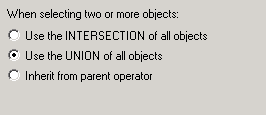
4. The report will now run as expected
VIDEO:
Here is a video demonstrating the steps to reproduce and workaround:
ADDITIONAL TROUBLESHOOTING
If the above workaround does not resolve the issue, please contact Strategy Technical Support with the information below:
--What is the error you receive when running the report in Enterprise Manager?
--Does this error occur for all reports or only specific reports in Enterprise Manager?
TO LEARN MORE:
Strategy System Administration guide Chapter 17. Analyzing System Usage with Enterprise Manager
Review the technotes below in the 'Related Links' section for more related information on this topic.
The Strategy Internal Reference Number for the issue discussed in this technical note is 854652
