EducationSoftwareStrategy.com
StrategyCommunity

Knowledge Base

Product

Community

Knowledge Base

TopicsBrowse ArticlesDeveloper Zone

Product

Download SoftwareProduct DocumentationSecurity Hub

Education

Tutorial VideosSolution GalleryEducation courses

Community

GuidelinesGrandmastersEvents
x_social-icon_white.svglinkedin_social-icon_white.svg
Strategy logoCommunity

© Strategy Inc. All Rights Reserved.

LegalTerms of UsePrivacy Policy
  1. Home
  2. Topics

KB47353: "Error in login. Invalid Login Mode" when clicking on a document hyperlink in Flash view mode to access a prompted report or graph in MicroStrategy Web 9.4.1 Hotfix 3


Community Admin

• Strategy


After installing MicroStrategy 9.4.1 Hotfix 3, when clicking on a document hyperlink in Flash View mode to access a prompted report or graph, the user is redirected to the login Page and the following error message appears after entering with the login information

SYMPTOM:
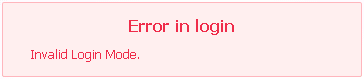
After installing Strategy 9.4.1 Hotfix 3, when clicking on a document hyperlink in Flash View mode to access a prompted report or graph, the user is redirected to the login Page and the following error message appears after entering with the login information:
ka04W000000OfVdQAK_0EM44000000266v.png


Error in login


Invalid Login Mode.

 
NOTES: 
This issue does not happen when clicking on hyperlinks for  Documents.
 
CAUSE:
This is a known issue in Strategy Web 9.4.1 Hotfix 3.
 
ACTION:
This issue has been addressed with Strategy 9.4.1 Hotfix 5. Upgrade to take advantage of the fix.


Comment

0 comments

Details

Knowledge Article

Published:

April 3, 2017

Last Updated:

April 3, 2017