In some scenarios, one may encounter cross joins in the SQL View of a standard, SQL Report in Strategy. Cross joins appear when two tables do not have any common key attributes between them in which they can inner join. As a result, the two tables essentially combine together to create one table that has all the data from both tables, but this results in poorer performance with a common effect of increased execution times. Sometimes these execution times, and performance hits, can be very severe. Therefore, it is important to understand some simple steps that can be performed to resolve a cross join, as well as some steps to understand why it may be appearing in the SQL View of the report.
One common occurrence of a cross join is when a report contains at least two unrelated attributes in the grid, and no metrics are present in order to relate the unrelated attributes via a fact table. Such an occurrence can be resolved in a few ways:
This provides a pathway from the fact table to the lookup tables in which the unrelated attributes are sourced from. The result is an inner join between the fact table and the lookup tables, which resolves the cross join between the two unrelated lookup tables.
Options 1 and 2 provide a means in which the report template can remain as only attributes, whereas Option 3 would have a metric on the report. Option 3 may not be desired if a metric does not want to be placed on the report. Keep in mind that other techniques can also be employed to have the metric on the report, but formatted to be hidden from display.
More common scenarios include cross joins between a fact table and a lookup table, and are typically surprising to a developer. These situations can be a bit more tricky to troubleshoot and resolve, but here are a few techniques that can be employed to try and resolve the issue:
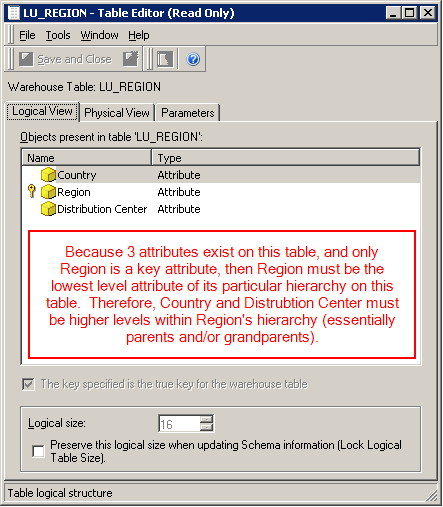
This means that just because a Region attribute exists on Table_A and a Region attribute exists on Table_B does not necessarily mean that the SQL Engine will join on Region. If Region has its child attribute on the table, then that attribute should be the key as it is the lowest level attribute of its particular hierarchy mapped to the table. If Region exists on both tables, and is also a key attribute on both tables, then an inner join should take place on Region.
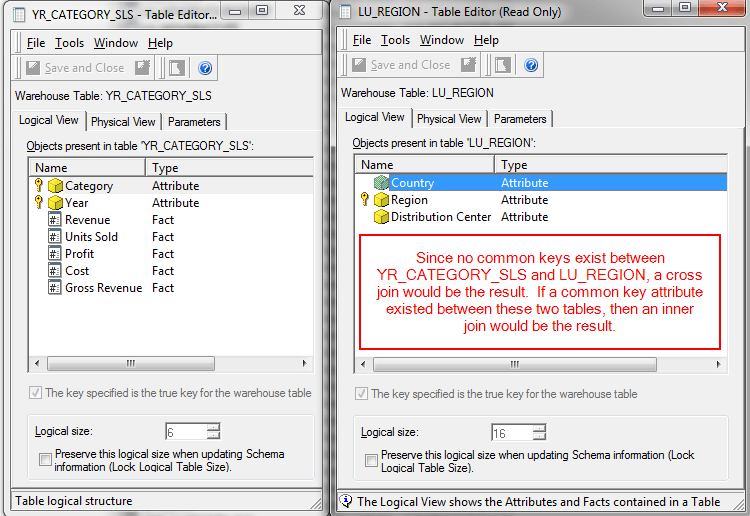
This essentially means that one can find a cross join, investigate the tables in which it appears, and verify if at least 1 common key attribute exists between the tables. If not, then that should be the first path to investigate because a cross join is correct in that scenario.
Note
Strategy Technical Support can assist with resolving cross joins in a specific report, however caution should be taken when resolving such issues. In some scenarios, the cross join is resolved through modifications to the schema objects, which can have a ripple effect to all other reports in an environment. For example, if a relationship is changed in the Region attribute to resolve a cross join in one report, this change will be reflected in all other reports that use Region, and potentially the hierarchy in which Region belongs. As a result, the SQL View of one report will have the cross join resolved, but the SQL may have changed in other reports using Region or its related attributes. This may or may not be desired. Strategy Technical Support may not be able to fully understand the impact of such a schema change to the data model, so before a change is made to the data model the consequences of such a change should be fully understood by the developer, and any changes made to the schema should be recorded.
