What are the limits to a project name in Strategy 9.x?
Projects are limited to 250 characters in their name in Strategy 9.x. If a user attempts to enter a project name that exceeds this limit, then the following warning message is displayed:
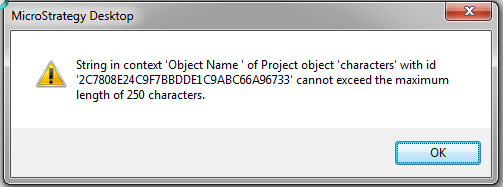
String in context 'Object Name' of Project object 'xxx' with id 'yyy' cannot exceed the maximum length of 250 characters.
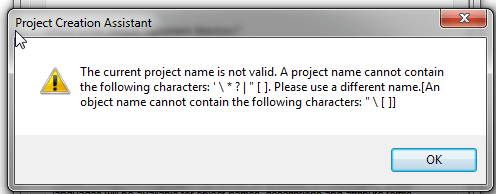
The current project name is not valid. A project name cannot contain the following characters: ' \ * ? | " . Please use a different name. [An object name cannot contain the following characters: "\[]]
In this particular encounter of the warning message, a project name should not contain the following characters, in addition to the previous four: ' * ? |
Keep in mind that additional invalid characters may show based on the metadata database used. The warning message above was generated in Strategy Tutorial, which utilizes a Microsoft Access metadata database. As a result, the additional four characters mentioned, ' * ? |, may only apply if Microsoft Access is used as the metadata database.
Ultimately, the primary rule should be followed, and the warning message should appear if any of the four invalid characters are used in an object's name: " \
Below is a video that shows how one may encounter these messages in Strategy Desktop or Strategy Developer 9.x:
The warning messages are not encountered so long as a project is created and the project is not renamed name to exceed 250 characters, including spaces, and so long as any of the four invalid characters for a project name are not used.
The Strategy Internal Reference Number for the issue discussed in this technical note is 874130
