EducationSoftwareStrategy.com
StrategyCommunity

Knowledge Base

Product

Community

Knowledge Base

TopicsBrowse ArticlesDeveloper Zone

Product

Download SoftwareProduct DocumentationSecurity Hub

Education

Tutorial VideosSolution GalleryEducation courses

Community

GuidelinesGrandmastersEvents
x_social-icon_white.svglinkedin_social-icon_white.svg
Strategy logoCommunity

© Strategy Inc. All Rights Reserved.

LegalTerms of UsePrivacy Policy
  1. Home
  2. Topics

KB47385: Unable to filter column when trying to import data via a database connection in MicroStrategy Web 9.4.1.


Community Admin

• Strategy


Unable to filter column when trying to import data via a database connection in MicroStrategy Web 9.4.1.

SUMMARY:
 
This issue has been classified as a defect by Strategy. The impact is limited to the Strategy Web 9.4.1 product when using Data Import with a Netezza database. One workaround exists for this defect. 
 
 
SYMPTOM:  
 
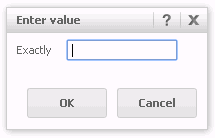
When filtering data in a column during a database connection data import, users are unable to filter as the input box freezes. This issue occurs for some columns but not all.  
 
 
STEPS TO REPRODUCE:
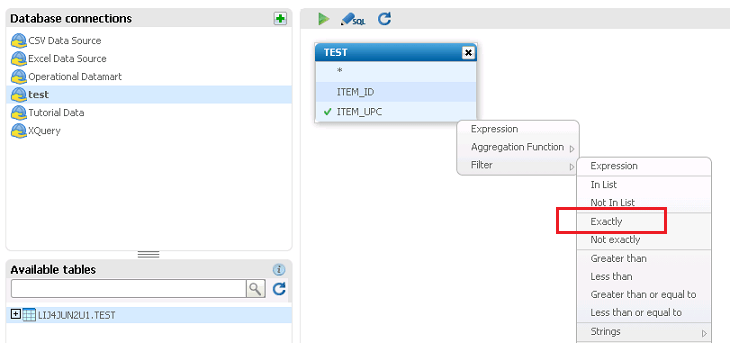
  • Import data via a database connection
  • Navigate to table with problematic column
  • Click on the drop down arrow of the column
  • Select Filter > Exactly
ka04W000000OdvpQAC_0EM44000000265k.png
  • Type in value and click OK                                                                                                                                                     
ka04W000000OdvpQAC_0EM44000000265d.png


CAUSE:  
 
When the column type is a BIGINT in the Netezza database, issue occurs. This is a known issue in Strategy Web 9.4.1.  
 
ACTION:  
This issue has been fixed in Strategy 10. Take advantage of upgrading for a fix. 
 
 
WORKAROUND:
 
Change the datatype accordingly as per the data (i.e - Char, Varchar, Numeric).


Comment

0 comments

Details

Knowledge Article

Published:

June 15, 2017

Last Updated:

June 15, 2017