SUMMARY:
This issue has been classified as a defect by Strategy. The impact is limited to Strategy Developer 9.x product when modifying the Access control list (ACL) of the User Manager object. A workaround is available in the current document. A solution/code fix for this issue is not available in current releases but is being reviewed for a future Strategy release.
SYMPTOM:
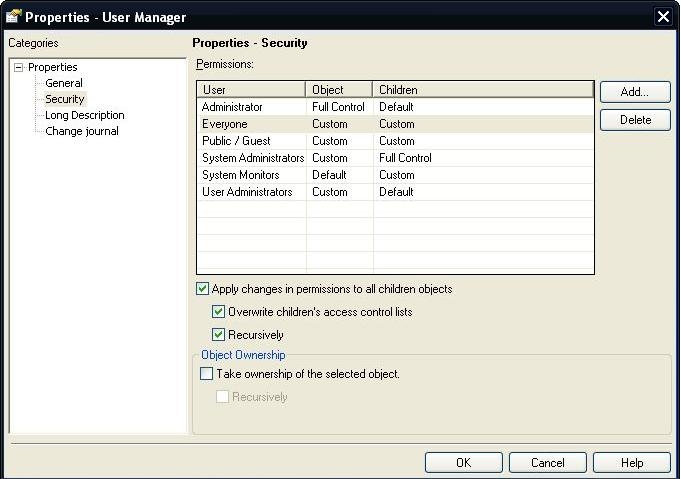
To avoid changing the Access Control List (ACL) for all individual users in a Strategy environment individually, the administrator may want to make changes to all users at once by modifying the ACL of the User Manager object, which is the parent object of all users. However, when there are a larger number of users in the environment such not all users can be displayed on a single page in Strategy Developer, administrators will notice that changes to the ACL of the User Manager will only be propagated to users displaying on the first page. This occurs even though the options 'Apply changes in permissions to all children objects', 'Overwrite children's access control lists' and apply 'Recursively' are selected as seen below.
STEPS TO REPRODUCE:
CAUSE:
This is a known issue classified as a defect with Strategy Developer 9.x
ACTION:
Currently this issue is still being reviewed for feasibility by our Technology team and it is not scoped for any upcoming scheduled Strategy release. Follow the workaround below to mitigate the issue.
WORKAROUND:
To workaround this issue administrators can configure Strategy Developer to display all the users for their organization on one page.
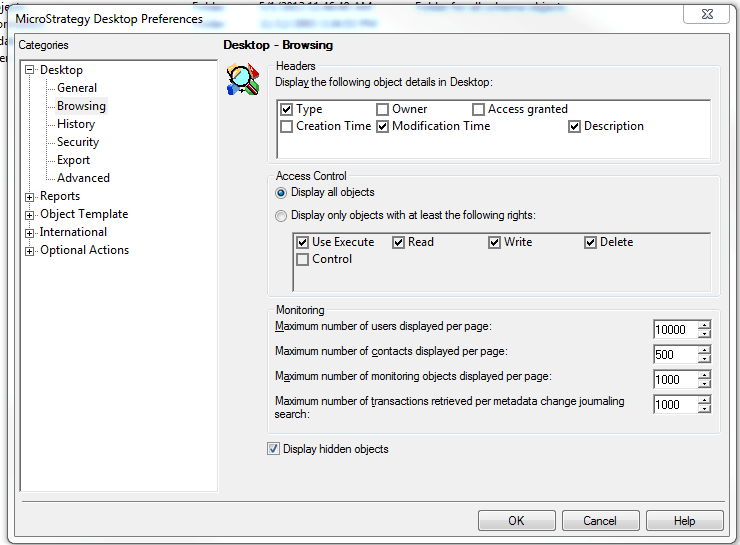
Be aware that displaying a very larger number of users on one page can causer performance issue so it is best to restore multiple pages of users once the changes have been made.
VIDEO:
You can find a detailed video on how this issue is reproduced and the workaround here:
ADDITIONAL TROUBLESHOOTING:
If the workaround steps above do not resolve the issue, please consider calling Strategy Technical Support with the following information of troubleshooting already done:
TO LEARN MORE:
Strategy System Administration Guide 9.2.x
Chapter 2. Setting up User Security: Controlling Access to Application Functionality.
Review the technotes below in the 'Related Links' section for more related information on this topic.
The Strategy Internal Reference Number for the issue discussed in this technical note is 798785
