EducationSoftwareStrategy.com
StrategyCommunity

Knowledge Base

Product

Community

Knowledge Base

TopicsBrowse ArticlesDeveloper Zone

Product

Download SoftwareProduct DocumentationSecurity Hub

Education

Tutorial VideosSolution GalleryEducation courses

Community

GuidelinesGrandmastersEvents
x_social-icon_white.svglinkedin_social-icon_white.svg
Strategy logoCommunity

© Strategy Inc. All Rights Reserved.

LegalTerms of UsePrivacy Policy
  1. Home
  2. Topics

KB47414: "Request Timeout" error message appears on the MicroStrategy Mobile Admin page when configuring a new project in Internet Explorer


Community Admin

• Strategy


A possible solution for "Request Timeout" error message which is received on the MicroStrategy Mobile Admin page when configuring a new project.

SYMPTOM:
In Strategy Mobile Admin page, when clicking on "Configure New Project" in the Mobile Configuration Connectivity Settings page, the following error appears in Internet Explorer:  
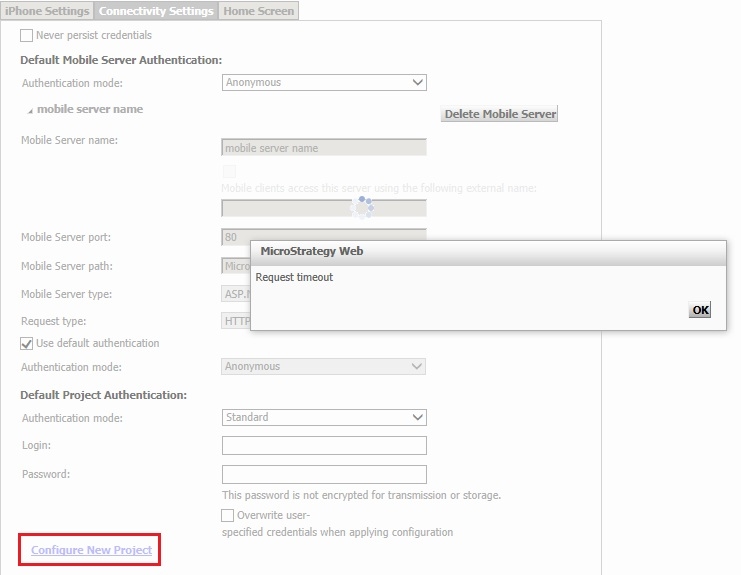
 

ka04W000001MKvGQAW_0EM440000002A4v.jpeg


Request Timeout

 
CAUSE:
A possible cause for this error is that a networking rule set in the browser is preventing Strategy Mobile from performing a check on itself to validate that a Strategy IServer is connected to the Strategy Mobile Admin page.
 
ACTION:
Add the Strategy Mobile Admin page URL with the full domain name to the list of Trusted Sites in Internet Explorer:

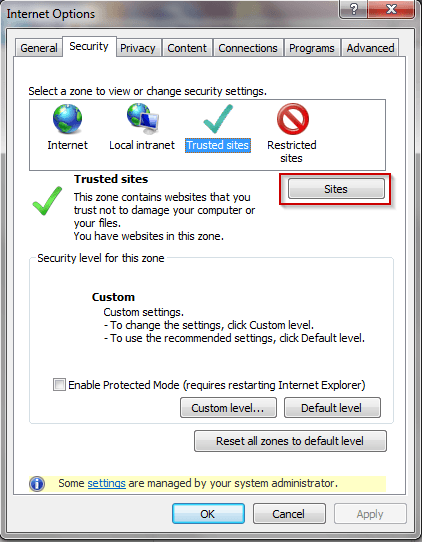
  • Navigate to Tools > Internet Options > Security > Trusted Sites, like shown below:
ka04W000001MKvGQAW_0EM440000002A4w.png
  • Click on the 'Sites' button.
  • Type in the URL box the Strategy Mobile Admin page URL with the fully qualified domain name (FQDN), such as:

    Sample Code/Error
    
    http://name.domain.com/MicroStrategyMobile/asp/Admin.aspx
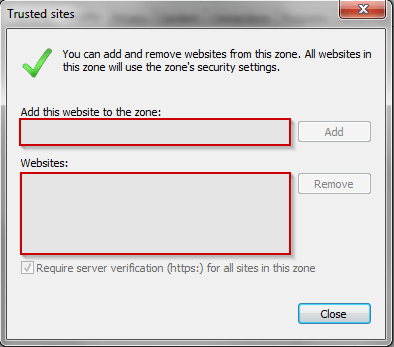

     
ka04W000001MKvGQAW_0EM440000002A4k.png
  • Add the URL.
    Note: if necessary, add the URL with the simple name as well.
     

Third Party Software Warning:
The third-party product(s) discussed in this Technical Note are manufactured by vendors independent of Strategy. Strategy makes no warranty, express, implied or otherwise, regarding these products, including their performance or reliability.


Comment

0 comments

Details

Knowledge Article

Published:

April 4, 2017

Last Updated:

April 4, 2017